
Adding Asana to your app
Asana has reorganized its interface, so the menus differ from older guides.-
First, open Asana and create an API token:
- Open your profile menu, which Asana now shows at the bottom of the sidebar.
- Open Settings, then the Apps tab.
- Select View developer console, previously labeled “Manage Developer Apps”.
- Select Create new token, give it a name such as
AppSignal, and copy the generated token.
-
Next, open your app on AppSignal.com.
- Open the “Integrations” page for the app.
- Select “Configure” for the Asana integration.
- Paste your Asana API token in the “API token” field.
- Copy and paste the project ID of the Asana project you want to link in the “Project ID” field.
- The project ID is part of the Asana project URL. In newer URLs it’s the number that follows
/project/, for examplehttps://app.asana.com/1/<WORKSPACE_ID>/project/<PROJECT_ID>/list. Older URLs use the formhttps://app.asana.com/0/<PROJECT_ID>/board. - The URL can contain several numeric IDs, so make sure you copy the one directly after
/project/, or after/0/in the older format.
- The project ID is part of the Asana project URL. In newer URLs it’s the number that follows
- Select the “create integration” button to create your Asana integration.
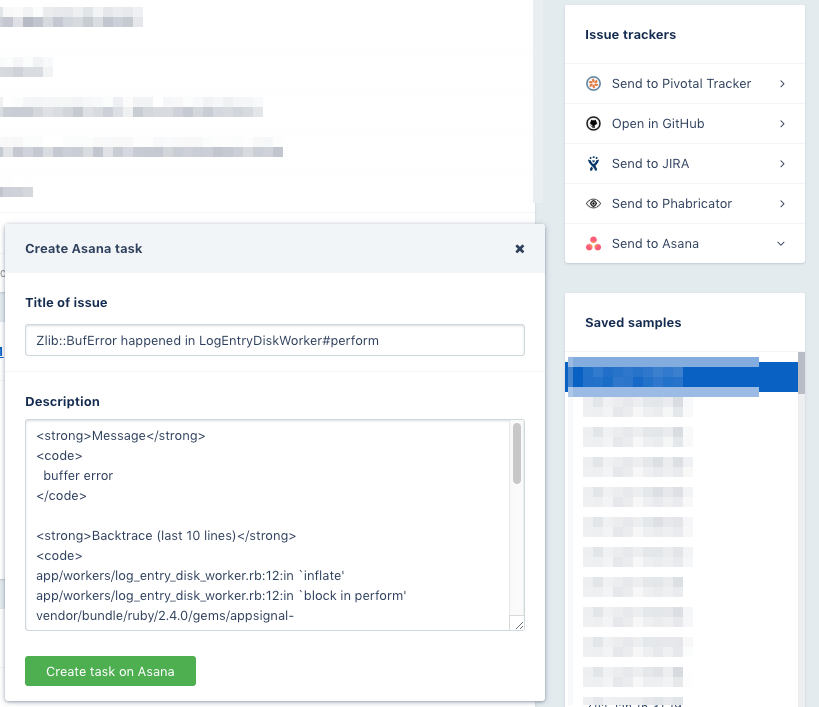
Create Asana tasks for incidents
Once Asana is connected, you can create an Asana task for an error incident:- Open the error incident’s details screen.
- In the Actions panel, select Send to Asana.