In this documentation, you can learn more about AppSignal’s usage policies, how your usage is calculated, and what that means for your AppSignal plan.

Requests Explained

AppSignal has request-based pricing, meaning you are charged based on the number of requests your application makes. We treat the following actions as requests:
  • Your app handles a request from a client.
  • Your app runs a background job.
We measure the total monthly requests from all your applications, and we have no host limit per app. For example, 1M requests could mean ten applications generating 100K requests each on a single server or a single application generating 1M requests across 50 servers. A request always contains performance metrics and may include error metrics (in case of an error). Even though we populate different parts of AppSignal based on that data, we still consider this a single request. At this time, custom metrics, uptime monitors, and host metrics do not count against your plan’s request limit.

Logging Storage Explained

Logging is a paid add-on and is charged based on storage buckets. All AppSignal plans come with 1GB of free logging storage. For logs above 1GB, you will be charged to the appropriate Logging plan, starting at 10GB. So, for example, if you need to store 8GB of logging data on average, you’d use the 10GB logging plan. Our upgrade policy applies to both APM and Logging plans. We review APM request usage and log storage separately, so exceeding your limit on one only starts a usage review for that plan.

Viewing Your Monthly Usage

You can see a quick overview of your application’s usage over the past 90 days, with a 30-day trailing average, from the usage page within the AppSignal application.

Exceeding Your Plan

Exceeding your plan limit triggers a 30-day usage review to determine whether a higher plan better fits your needs. You’ll stay on your current plan during those 30 days. If your usage returns within your plan limit during that time, the usage review closes with no upgrade required. See our upgrade policy for the full process. At the end of the 30-day usage review, we compare your usage over the last 30 days and the last 14 days with your plan limit. We convert both figures to a monthly equivalent:
  • If your 30-day usage is within your plan limit, the usage review closes with no change to your plan.
  • If both figures are over your plan limit, we upgrade your plan to one that matches your usage.
  • If your 30-day usage is over your plan limit but your 14-day usage is within it, we extend the usage review by another 30 days. At day 60, we check your last 30 days of usage again. If it is still over your plan limit, we upgrade your plan. Otherwise, the usage review closes with no change.
This policy applies from December 1, 2026. Usage reviews opened before that date follow the previous policy, which required an upgrade if you exceeded your plan limit by more than 10% in at least two of the three most recent months. Free plan accounts are an exception and are locked when they exceed their request or logging limit. Usage reviews also do not apply to accounts in a trial, paying by bank transfer, sponsored, or provisioned through Heroku. Accounts with a custom APM limit are reviewed on log storage only.

Upgrading Your Plan

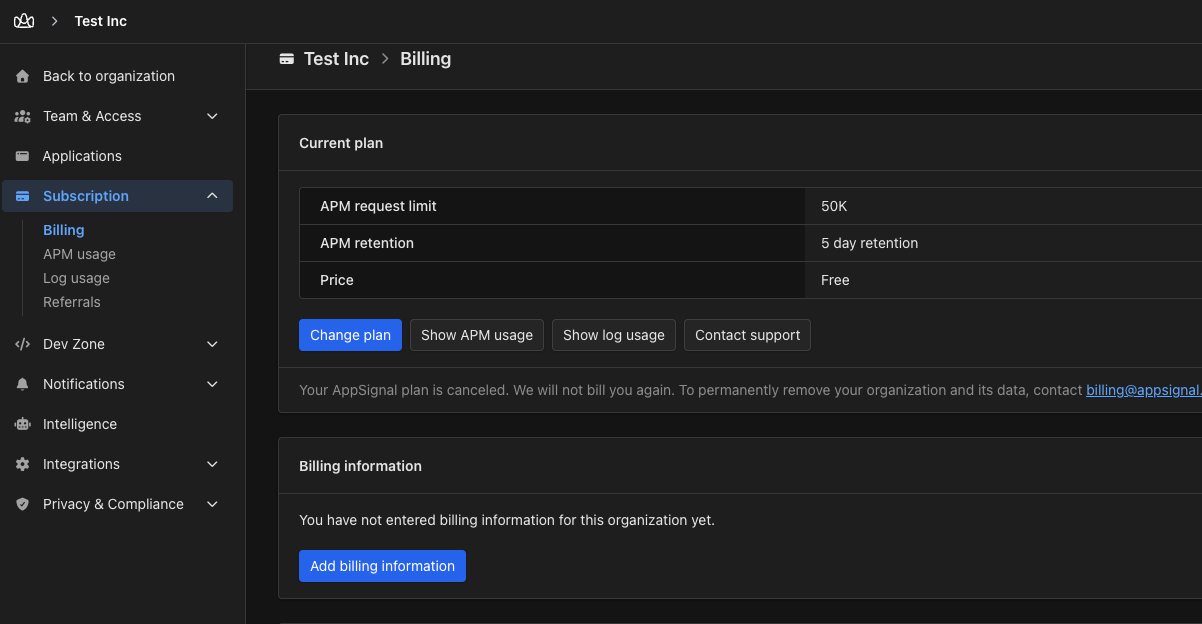
Screenshot of the billing page The above screenshot is for illustration purposes only. You can find actual information on plan pricing and limits on our pricing page. AppSignal emails your organization owners when a usage review starts, with a check-in on day 14, and follows up with the review outcome. You’ll always hear from us before your plan is upgraded. Once a usage review starts, you have at least 30 days to manually upgrade your plan or reduce your usage before AppSignal automatically upgrades your plan. Manual or automatic, AppSignal invoices the price difference for the upgrade right away. It covers the rest of your current billing period, or the rest of your year on a yearly plan.

Manual Upgrades

To upgrade your plan manually, head to the Billing page via the app, or from a link in our email. You’ll see our plan calculation based on your current usage. Once your plan has been upgraded, your organization owners will receive a confirmation email from us. If you do not manually upgrade your plan or reduce your usage before the usage review ends, your plan will be automatically upgraded. When your plan has been upgraded, don’t forget to email us to redeem some free stroopwafels 🍪.

Automatic Upgrades

If you haven’t manually upgraded or reduced your usage, and your usage is still over your plan limit when the usage review ends, we automatically upgrade you to a plan that matches your measured usage. We won’t move you to a plan larger than your usage requires or smaller than your current plan. Your billing dates stay the same, and we won’t start another usage review until after your next billing cycle. Once your plan has been upgraded, your organization owners receive a confirmation email from us.

Reduce Your Usage

If your usage has been below your current plan’s usage allowance for more than 30 days, you can downgrade to a lower usage plan on the plan page.
You have at least 30 days from when a usage review opens to reduce your usage before your plan is automatically upgraded.

Reducing Your Requests

You can learn more about reducing your application’s requests in our Limiting Requests documentation. You can also check the usage page to see if your usage is still over your current plan’s limits. At the end of your usage review, we check whether your current plan still fits your application’s usage. If you’re still over your plan limit, we upgrade your plan to one that matches your usage. If you’re within your limit, the usage review closes with no change to your plan. A new usage review can only start if you exceed your limit again. See our upgrade policy for the full process.

Reducing Your Logging

If you want to reduce your logging usage, we recommend reading our “What logs should I store?” Learning Center article.

Contact Us

If you need more clarification about upgrading your application or extra support regarding reducing your usage, you can contact us for assistance. We’ll help you choose a plan that best suits your needs and budget.

Throttling and Ignoring Actions

Currently, we do not support throttling or allow you to limit the number of requests AppSignal collects for a single action or logs stored. Doing this would interfere with the reliability of your application’s monitoring data and severely limit AppSignal’s ability to give you the accurate data you need to monitor and manage your application’s usage and performance properly. For example, features such as Anomaly Detection would no longer be able to function correctly.