
webfor web requestsfrontendfor Front-end JavaScriptbackgroundfor background jobs
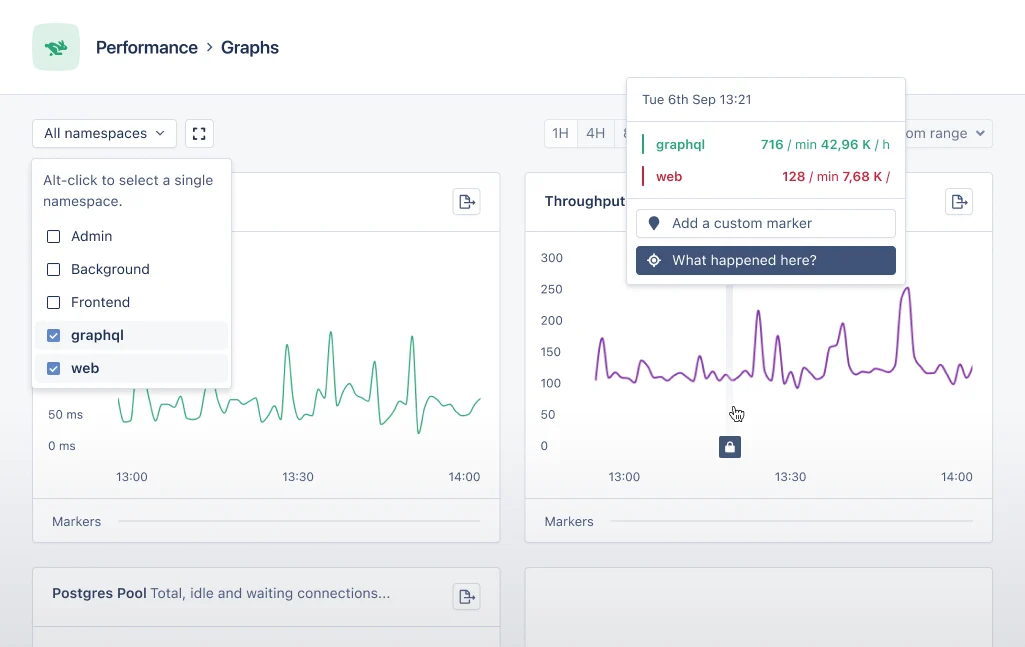
The above image shows example graphs with multiple namespaces, splitting out a GraphQL API and the Web namespace.
Configuring Namespaces
Namespaces are defined by your application’s code. With small helpers, you can customize the namespace of an action. This guide will teach you how to split requests up into different namespaces. For this guide, we’ll create an “admin” and a “critical” namespace for background jobs.Configurations per Language
Ruby
In Rails we can use thebefore_action callback to call a method before a request is handled. In the code example below, we’ve created a before_action that calls the set_appsignal_namespace method. In this method we call the Appsignal.set_namespace helper method to configure “admin” as the namespace for this request. This also works if other controllers are subclasses of the AdminController.
Appsignal.monitor helper. It accepts the namespace as a keyword argument.
set_namespace method to configure the transaction’s namespace, like in the example below:
A note on helper location
Theset_namespace helpers used in this guide can be called in any action that is part of an AppSignal trace. We recommend calling this as early in the request or background job as possible, so the transaction is configured with the given namespace before any error occurs. Otherwise, if an error occurs, or anything else that stops the process, the transaction is sent to AppSignal before the set_namespace helper is called, and the trace is reported under the default namespace instead.
Read More
Elixir
In Phoenix controllers we use aplug to call a function before the request is handled by Phoenix. In the code example below we use plug to call the set_appsignal_namespace function (line 5). In this function we call the Appsignal.Span.set_namespace helper to configure the namespace for this request (line 10).
Appsignal.Span.set_namespace must be called at the beginning of the function before any other code, like on line 4 of the below code example:
A note on helper location
Theset_namespace helpers used in this guide can be called in any action that starts an AppSignal transaction. We recommend calling this as early in the request or background job as possible, so the transaction is configured with the given namespace before any error occurs. Otherwise, if an error occurs—or anything else that stops the process—the transaction is sent to AppSignal before the set_namespace code is called and it is reported under the default namespace instead.
Read More
Appsignal.Span.set_namespaceHelper Method Documentation- Elixir Namespace Decorator
- Elixir Namespace Instrumentation Helper
Node.js
In Node.js applications, AppSignal works with OpenTelemetry, which uses spans to track metadata, such as which namespace a span belongs to. Use thesetNamespace helper function as sampled below to set the namespace for the active span’s trace.
PHP
In PHP applications, AppSignal works with OpenTelemetry, which uses spans to track metadata, such as which namespace a span belongs to. Use theAppsignal::setNamespace helper method to set the namespace for the active span’s trace.
Python
In Python applications, AppSignal works with OpenTelemetry, which uses spans to track metadata, such as which namespace a span belongs to. Use theset_namespace helper function as sampled below to set the namespace for the active span’s trace.
Front-end JavaScript
In Front-end JavaScript applications AppSignal works with spans to track metadata such as a span’s namespace. When creating this span, callsetNamespace with a String value of the desired namespace name, as demonstrated in the below example:
Go
In Go applications, AppSignal works with OpenTelemetry, which uses spans to track metadata, such as which namespace a span belongs to. On any span in the trace, set aappsignal.namespace attribute with a String value of the new namespace.
appsignal.namespace attribute are found, the span with the newest timestamp is leading.
Read more about how custom instrumentation works in Go.
Java
In Java applications, AppSignal works with OpenTelemetry, which uses spans to track metadata, such as which namespace a span belongs to. On any span in the trace, set aappsignal.namespace attribute with a String value of the new namespace.
appsignal.namespace attribute are found, the span with the newest timestamp is leading.
Read more about how custom instrumentation works in Java.