
Browser monitoring is a beta AppSignal Labs feature. The
@appsignal/browser package is published under the beta tag on npm, and its
configuration and API may still change between beta releases. Share feedback
in our Discord community.init(). Up to 25 breadcrumbs from the error context buffer travel with each reported error, including a breadcrumb for that error. You can read them in the issue’s sample.
What is collected
These automatic categories can appear with an error report:
The
breadcrumbs options can turn off network, console, click, and long-task collection. Navigation, visibility, and error breadcrumbs have no separate switch.
Labeling elements
Selection breadcrumbs describe the element the way a person would recognize it, rather than by its position in the page. AppSignal first looks for adata-breadcrumb attribute. Otherwise, it uses the element type and text, such as button "Submit". If neither helps, it uses the tag and ID, such as input#cvc.
When the automatic label is unhelpful, or when the visible text is something you would rather not send, set your own:
Adding your own breadcrumbs
Record anything else worth knowing withaddBreadcrumb():
Your own breadcrumbs travel with errors whatever category you give them.
What the SDK does not capture automatically
- Request and response bodies. The SDK does not read them from network calls. If a payload matters for debugging, add only the parts you need with
addBreadcrumb(). - Cookies. The SDK reads and writes none.
- Query parameters in most SDK-created URL fields.
privacy.queryParamsAllowlistremoves them by default from navigation andfetch/XMLHttpRequestbreadcrumbs. The initial document-load breadcrumb is an exception. - Blocked
fetchandXMLHttpRequestcalls. Calls matchingprivacy.networkBlocklist, and calls to AppSignal’s own endpoint, leave no breadcrumb and are never reported as failed requests. The initial document-load breadcrumb is not covered by the blocklist. - Text and elements you have masked. Read more in masking and blocking page elements.
beforeBreadcrumb.
Reading network breadcrumbs
A network breadcrumb reads as method, URL, and status whenever a response arrived, including404 and 500 responses. An (error) suffix means no response arrived. The cause may be DNS, a refused connection, or a blocked request.
A request that sent a traceparent header also records its trace ID in the breadcrumb. Its row shows an Open trace button, and selecting it opens the related trace’s timeline. The timeline shows back-end spans only if the receiving service is instrumented and the trace is within your data retention. Otherwise, it reads “No backend spans found for this request”.
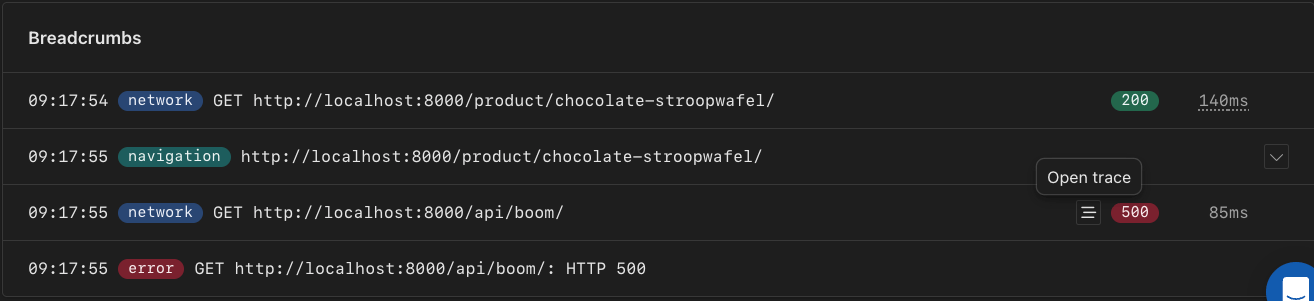
The Open trace button on a network breadcrumb that carries a trace ID.
Timing-Allow-Origin header. That is a browser restriction, not an AppSignal one.