> ## Documentation Index
> Fetch the complete documentation index at: https://docs.appsignal.com/llms.txt
> Use this file to discover all available pages before exploring further.

# Active Job

export const VersionRequirements = ({versions = []}) => {
  if (!Array.isArray(versions) || versions.length === 0) {
    return null;
  }
  const boundaries = {
    upper: " or lower",
    exact: "",
    lower: " or higher"
  };
  const containerStyle = {
    marginTop: "0.5rem",
    marginBottom: "1.5rem"
  };
  const lineStyle = {
    display: "block",
    margin: "0 0 0.35rem 0",
    fontSize: "0.875rem",
    lineHeight: "1.4"
  };
  const pillBaseStyle = {
    display: "inline-block",
    padding: "0.1em 0.4em",
    borderRadius: "0.25rem",
    border: "1px solid",
    fontFamily: "ui-monospace, SFMono-Regular, Menlo, monospace",
    fontSize: "0.85em",
    fontWeight: 500
  };
  const pillColors = {
    "AppSignal for Elixir": {
      background: "#f3e8ff",
      borderColor: "#e9d5ff",
      color: "#9333ea"
    },
    "AppSignal for Front-end": {
      background: "#fef9c3",
      borderColor: "#fde68a",
      color: "#ca8a04"
    },
    "AppSignal for Go": {
      background: "#ccfbf1",
      borderColor: "#99f6e4",
      color: "#0d9488"
    },
    "AppSignal for JavaScript": {
      background: "#fef9c3",
      borderColor: "#fde68a",
      color: "#ca8a04"
    },
    "AppSignal for Node.js": {
      background: "#dcfce7",
      borderColor: "#bbf7d0",
      color: "#16a34a"
    },
    "AppSignal for Python": {
      background: "#dbeafe",
      borderColor: "#bfdbfe",
      color: "#2563eb"
    },
    "AppSignal for Ruby": {
      background: "#fee2e2",
      borderColor: "#fecaca",
      color: "#dc2626"
    },
    "AppSignal for Rust": {
      background: "#ffedd5",
      borderColor: "#fed7aa",
      color: "#ea580c"
    }
  };
  const defaultPillColor = {
    background: "#f4f4f5",
    borderColor: "#e4e4e7",
    color: "#52525b"
  };
  const getPillStyle = name => ({
    ...pillBaseStyle,
    ...pillColors[name] || defaultPillColor
  });
  const getBoundText = bound => {
    return boundaries[bound] || boundaries.lower;
  };
  return <div style={containerStyle}>
      {versions.map((v, i) => <p key={`${v.name}-${v.version}-${v.bound || "lower"}-${i}`} style={lineStyle}>
          This feature requires{" "}
          <code style={getPillStyle(v.name)}>{v.name}</code> version {v.version}
          {getBoundText(v.bound)}.
        </p>)}
    </div>;
};

export const Compatibility = ({versions = [], label = "Available in"}) => {
  if (!Array.isArray(versions) || versions.length === 0) {
    return null;
  }
  const defaultPillStyle = {
    borderColor: "#d4d4d8",
    background: "#f4f4f5",
    color: "#3f3f46"
  };
  const pillStyles = {
    "AppSignal for Elixir": {
      background: "#f3e8ff",
      borderColor: "#d8b4fe",
      color: "#6b21a8"
    },
    "AppSignal for Front-end": {
      background: "#fef9c3",
      borderColor: "#fde047",
      color: "#854d0e"
    },
    "AppSignal for Go": {
      background: "#ccfbf1",
      borderColor: "#5eead4",
      color: "#115e59"
    },
    "AppSignal for JavaScript": {
      background: "#fef9c3",
      borderColor: "#fde047",
      color: "#854d0e"
    },
    "AppSignal for Node.js": {
      background: "#dcfce7",
      borderColor: "#86efac",
      color: "#166534"
    },
    "AppSignal for Python": {
      background: "#dbeafe",
      borderColor: "#93c5fd",
      color: "#1e40af"
    },
    "AppSignal for Ruby": {
      background: "#fee2e2",
      borderColor: "#fca5a5",
      color: "#991b1b"
    },
    "AppSignal for Rust": {
      background: "#ffedd5",
      borderColor: "#fdba74",
      color: "#9a3412"
    }
  };
  const getPillStyle = name => ({
    ...defaultPillStyle,
    ...pillStyles[name] || ({})
  });
  return <div className="not-prose my-4 rounded-lg border border-zinc-200 bg-zinc-50 px-4 py-3 text-sm dark:border-white/10 dark:bg-white/5">
      <div className="flex flex-wrap items-center gap-x-2 gap-y-1">
        <span className="font-semibold text-zinc-700 dark:text-zinc-200">
          {label}:
        </span>
        {versions.map((v, i) => <span key={`${v.name}-${v.version}-${i}`} className="inline-flex items-center gap-1 rounded-full border px-2 py-0.5 text-xs font-medium" style={getPillStyle(v.name)}>
            <span>{v.name}</span>
            <span className="opacity-70">
              {v.version}
              {v.exact ? "" : "+"}
            </span>
          </span>)}
      </div>
    </div>;
};

<VersionRequirements
  versions={[
{ name: "AppSignal for Ruby", version: "2.11.0" }
]}
/>

Active Job is a framework for declaring jobs and making them run on a variety of queuing backends shipped with Rails.

The Active Job integration tracks the execution and events from the job being performed.

When AppSignal detects Active Job metrics, it will create an [Magic Dashboard](#magic-dashboard), allowing you to monitor core metrics visually.

## Supported adapters

The Active Job integration supports all [Active Job adapters](https://api.rubyonrails.org/classes/ActiveJob/QueueAdapters.html).

It may also offer support for adapters not listed on that page, which are accessible through a separate gem. However, please note that these adapters have not been tested.

## Integration with AppSignal-supported libraries

The following background job libraries that AppSignal supports are automatically integrated with Active Job, allowing AppSignal to give you more in-depth performance insights:

* [Delayed::Job](/ruby/integrations/delayed-job)
* [Que](/ruby/integrations/que)
* [Resque](/ruby/integrations/resque)
* [Sidekiq](/ruby/integrations/sidekiq)
* [Solid Queue](/ruby/integrations/solidqueue)

## Report errors on job discard

<Compatibility
  versions={[
{ name: "AppSignal for Ruby", version: "3.7.3" },
{ name: "Active Job", version: "7.1.0" },
]}
/>

Set the [`activejob_report_errors` config option](/ruby/configuration/options#option-activejob_report_errors) to `discard` to only report errors when a job is discarded. When a job is discarded, all job retries have been exhausted, and the job is no longer retried. Read the [Active Job documentation](https://guides.rubyonrails.org/active_job_basics.html#exceptions) to learn more about Active Job exception handling and failed job retries.

<CodeGroup>
  ```ruby Ruby theme={null}
  class ExampleJob < ActiveJob::Base
    # Configure the retry attempts using the `retry_on` method
    retry_on StandardError, :attempts => 2

    # ...
  end
  ```
</CodeGroup>

<Warning>
  Some Active Job adapters (such as Sidekiq, Delayed::Job, etc.) have their own
  retry system. After Active Job has exhausted its retries, these libraries
  may trigger their own job retry system.

  This will retry jobs even after it has exhausted the Active Job retries and
  discarded the job. To avoid retrying jobs after Active Job has stopped
  retrying the job, and it reporting errors for those retries, make sure the
  adapter's retry system is disabled.

  When relying on Sidekiq's retry system, also configure it [to report errors
  only on discard](/ruby/integrations/sidekiq#report-errors-on-job-discard),
  so that it won't report errors multiple times.
</Warning>

## Metadata

AppSignal collects the following metadata for Active Job jobs:

| Metadata        | Description                                                                      |
| --------------- | -------------------------------------------------------------------------------- |
| Active Job ID   | The Active Job ID is reported by the Active Job adapter.                         |
| Arguments       | Arguments passed to the job when calling `perform_later`.                        |
| Events          | All `*.active_job` events.                                                       |
| Job name        | e.g. `MyBackgroundJob#perform` as used to group the job for AppSignal incidents. |
| Priority        | The sample's priority, if using an adapter that supports job priority.           |
| Provider job ID | The job ID reported by the Active Job adapter.                                   |
| Queue           | The sample's queue name, if using an adapter that supports multiple queues.      |
| Queue time\*    | Time elapsed from a job being queued and performed.                              |

*\*From Rails version 6 onwards queue times are reported for the namespace they are reported from and can be viewed in AppSignal's [Performance Graphs](https://appsignal.com/redirect-to/app?to=performance/graphs).*

AppSignal uses Active Job metadata to give you deeper contextual insights into job performance. When inspecting Active Job samples in AppSignal:

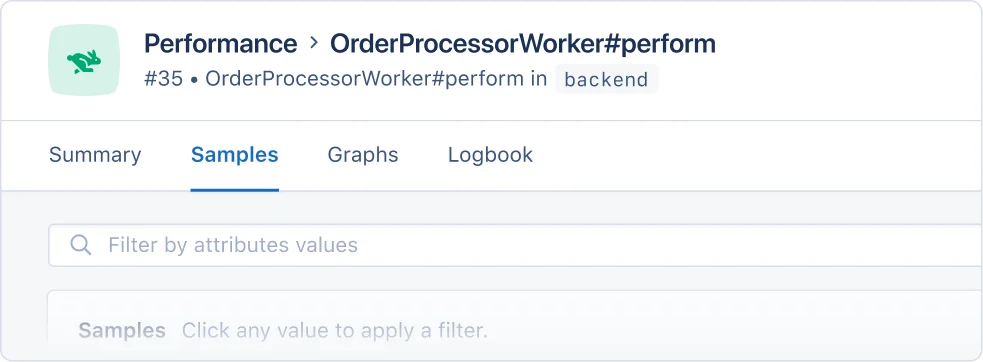
* The Job name will be used to group the job for AppSignal incidents:

<img src="https://mintcdn.com/appsignal-715f5a51/4TRZP0Sq9Zq7PAPW/assets/images/screenshots/ruby/integrations/active-job/job-performance-samples.png?fit=max&auto=format&n=4TRZP0Sq9Zq7PAPW&q=85&s=866403a09bc23c27704ecd4ac96dc1c7" alt="Example performance issues overview" width="983" height="362" data-path="assets/images/screenshots/ruby/integrations/active-job/job-performance-samples.png" />

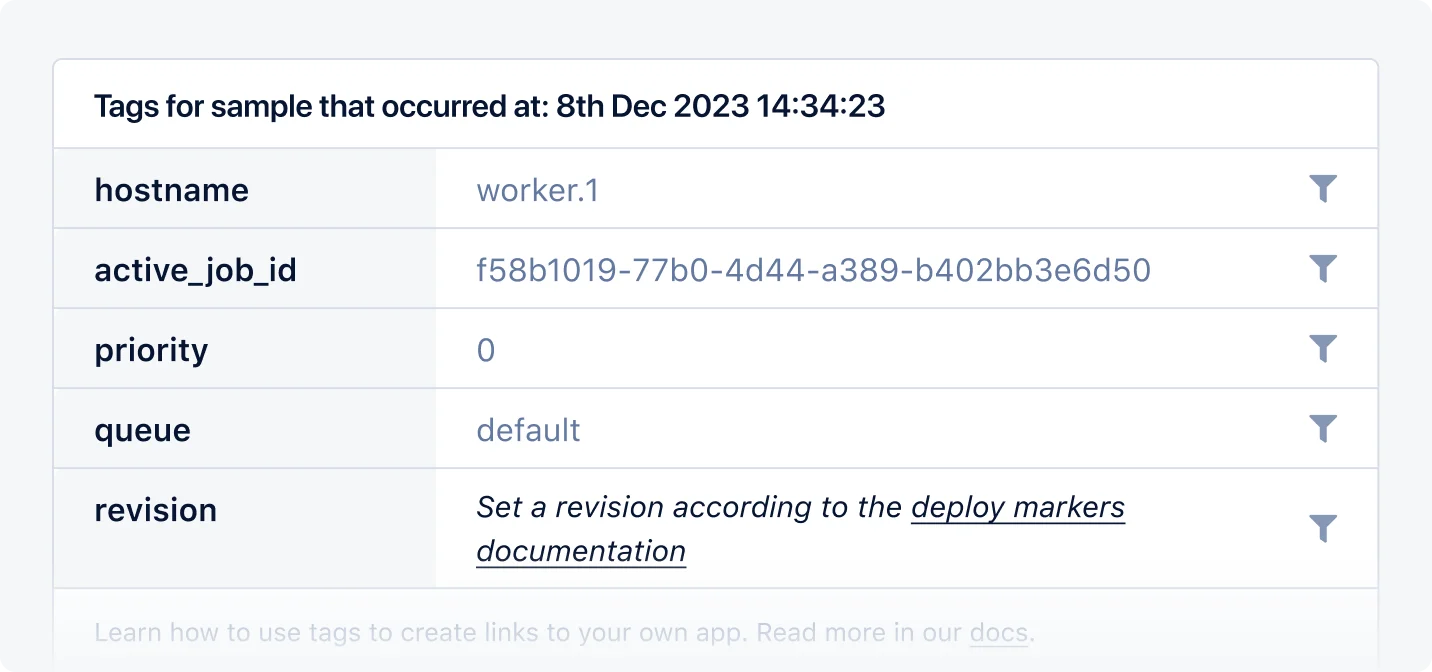
* Metadata (excluding job name and events) will be available as filterable tags on incident samples:
<img src="https://mintcdn.com/appsignal-715f5a51/4TRZP0Sq9Zq7PAPW/assets/images/screenshots/ruby/integrations/active-job/job-tags.png?fit=max&auto=format&n=4TRZP0Sq9Zq7PAPW&q=85&s=35ac92fc750684d84cf17fa9ed4244c5" alt="Example Active Job tags" width="1432" height="672" data-path="assets/images/screenshots/ruby/integrations/active-job/job-tags.png" />

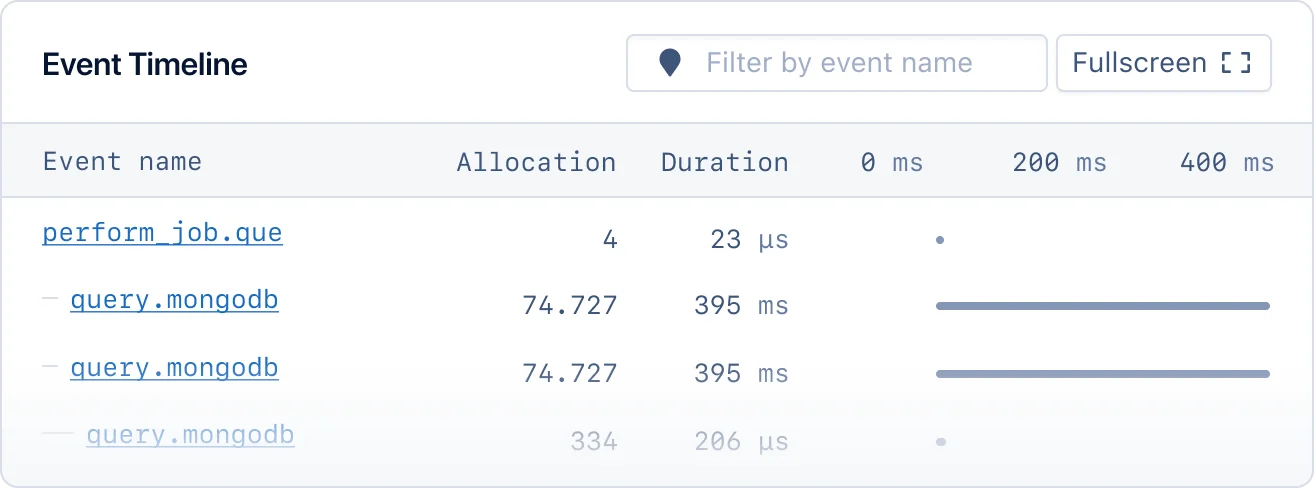
* `*.active_job` events will shown in the event timeline for performance samples:
<img src="https://mintcdn.com/appsignal-715f5a51/4TRZP0Sq9Zq7PAPW/assets/images/screenshots/ruby/integrations/active-job/job-event-timeline.png?fit=max&auto=format&n=4TRZP0Sq9Zq7PAPW&q=85&s=920c59814955e89708efb652d5d13cfd" alt="Example Event timeline" width="1314" height="488" data-path="assets/images/screenshots/ruby/integrations/active-job/job-event-timeline.png" />

## Magic dashboard

When AppSignal receives Active Job metrics, it will create an Active Job magic dashboard, available from the dashboard section of the AppSignal app.

The Active Job magic dashboard will have the following graphs:

| Graph                                                                           | Metrics                      | [Tags](#tags)                                        |
| ------------------------------------------------------------------------------- | ---------------------------- | ---------------------------------------------------- |
| [Duration per job class](#duration-per-job-class-graph)                         | `transaction_duration`       | <li>`namespace`</li><li>`action`</li>                |
| [Job status per queue](#job-status-per-queue-graph)                             | `active_job_queue_job_count` | <li>`status`</li><li>`queue`</li>                    |
| [Job status per queue with priority](#job-status-per-queue-with-priority-graph) | `active_job_queue_job_count` | <li>`status`</li><li>`queue`</li><li>`priority`</li> |
| [Throughput per job class](#throughput-per-job-class-graph)                     | `transaction_duration`       | <li>`namespace`</li><li>`action`</li>                |

Tags give you a contextual breakdown of Active job performance information, currently AppSignal reports the following tags for Active Job jobs:

| Name       | Description                                                                                                       |
| ---------- | ----------------------------------------------------------------------------------------------------------------- |
| `action`   | The name of the action the metric was reported from (eg: `YourWorker#perform`).                                   |
| `queue`    | Named queue in which jobs are processed, e.g. `default` or `mailer`.                                              |
| `status`   | Status of each job, either `processed` or `failed`. <br />Jobs that are `failed` are also counted as `processed`. |
| `priority` | The priority given to each job, e.g. `0` or `1`.                                                                  |

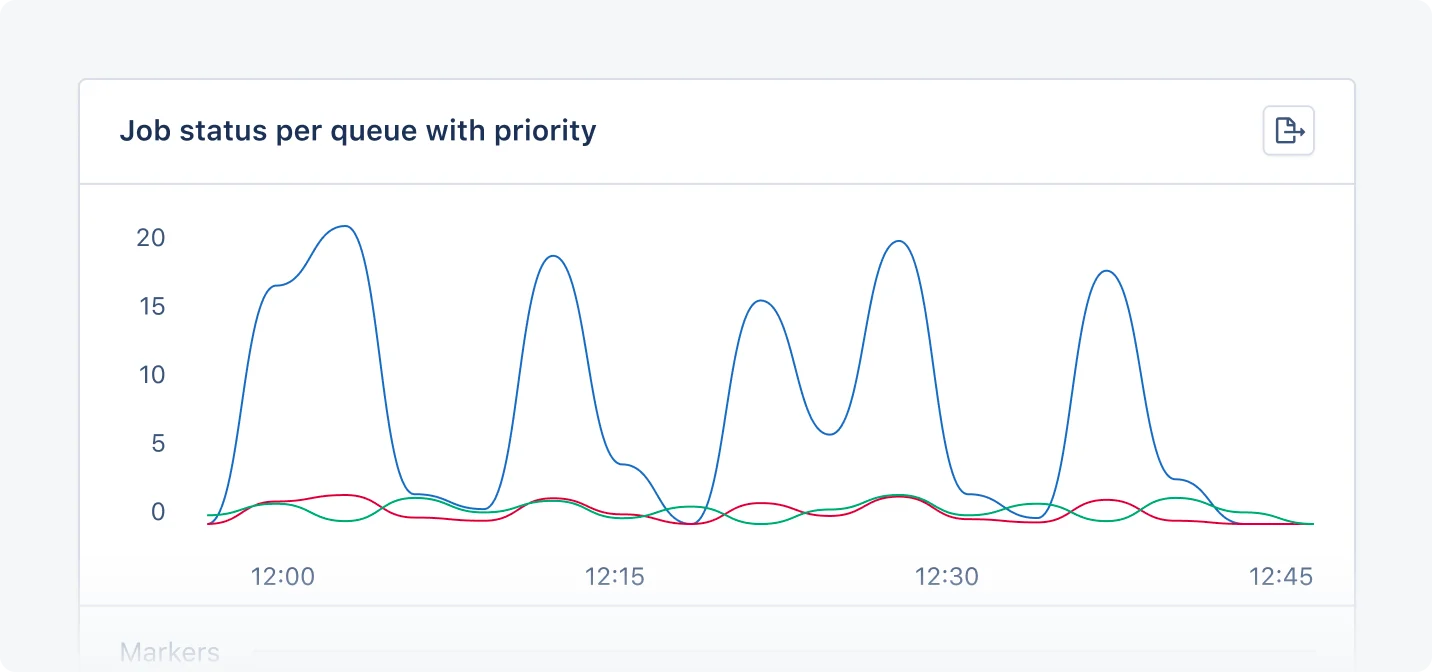
Each tag will be represented with a colored line on the graph:

<img src="https://mintcdn.com/appsignal-715f5a51/4TRZP0Sq9Zq7PAPW/assets/images/screenshots/ruby/integrations/active-job/dashboard.png?fit=max&auto=format&n=4TRZP0Sq9Zq7PAPW&q=85&s=a5675ac1b157ee8ba348e3a1563b5793" alt="Example Actie Job dashboard" width="1432" height="672" data-path="assets/images/screenshots/ruby/integrations/active-job/dashboard.png" />

### Duration per job class graph

The Duration per job class graph shows the amount of time that it took for jobs to execute, grouped by the class that defines the job.

You can use this graph to monitor the performance of jobs, per class, giving you a helicopter view of job performance and allowing you to quickly identify and investigate spikes in duration time.

### Job status per queue graph

The Job status per queue with priority graph shows the number of jobs that were executed, grouped by their resulting status, by the queue in which they were enqueued.

You can use this graph to monitor job error counts and performance based on queue, identify bottlenecks, and optimize your background jobs for scalability.

### Job status per queue with priority graph

<Tip>
  Not all [Active Job adapters](#supported-adapters) support job priority. If
  jobs have no priority values, the graph will be empty.
</Tip>

The Job status per queue with a priority graph shows the number of jobs that were executed,
grouped by their resulting status by the queue in which they were enqueued, and by
the priority that was given to them.

You can use this graph to monitor job error counts and performance based on queue and priority identify bottlenecks, and optimize your background jobs for scalability.

### Throughput per job class graph

The Throughput per job class graph shows the amount of jobs that were executed, grouped by the class that defines the job.

You can use this graph to monitor how many jobs are executed, grouped by the class that defines the job.
