> ## Documentation Index
> Fetch the complete documentation index at: https://docs.appsignal.com/llms.txt
> Use this file to discover all available pages before exploring further.
# Add method instrumentation
Notes:
-
This feature is available since Ruby gem version 1.3 and only works for
classes.
-
Ruby 3.0 support for keyword arguments was added in Ruby gem `2.11.4`.
Sometimes [instrumentation blocks](/ruby/instrumentation/instrumentation) are not accurate enough. Every application is different, and so is the code that runs it. Developers know what code and, more accurately, what methods to instrument.
It's possible to instrument methods in your Ruby code directly with AppSignal.
Using the `appsignal` Ruby gem you can use our object integrations which
provides you with some useful helpers to do so.
## Installation
Activate the object integration by requiring the following line after loading
the appsignal gem itself
```ruby Ruby theme={null}
require 'appsignal/integrations/object'
```
and proceed to specify which methods you want to test on any class you want.
### Example
```ruby Ruby theme={null}
require 'appsignal'
require 'appsignal/integrations/object'
class Foo
def bar
1
end
appsignal_instrument_method :bar
def self.bar
2
end
appsignal_instrument_class_method :bar
end
Foo.new.bar
# => 1
Foo.bar
# => 2
```
## Usage
We have different helpers for instance methods and class methods,
`appsignal_instrument_method` and `appsignal_instrument_class_method`
respectively.
Call them on class level in any Ruby class, even those from the Ruby standard
library, and start instrumenting. You don't need to include anything else in
the class, once you load the integration file it becomes available everywhere.
Instrument any method by calling the helper with the name of the method
you want to instrument. If the method does not exist, it will throw
an error, just like Ruby would do by default.
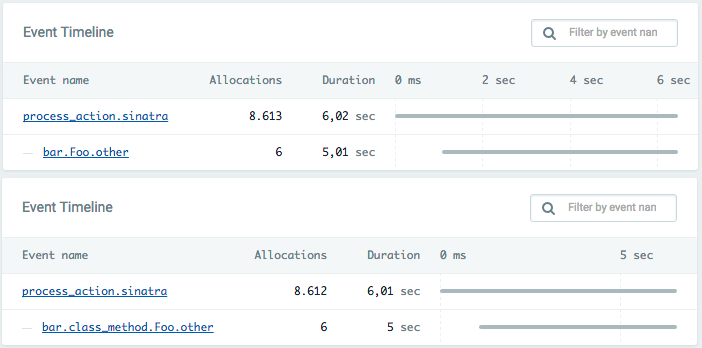
Once a request has been processed by AppSignal with this type of
instrumentation you will be able to see the method instrumentation in the event
breakdown on the sample page.
 You're also able to customize the name of the event that's send to us using the
`:name` option.
```ruby Ruby theme={null}
class Foo
def bar
end
appsignal_instrument_method :bar
def self.bar
end
appsignal_instrument_class_method :bar, name: "bar.class_method.Foo.methods"
end
```
You're also able to customize the name of the event that's send to us using the
`:name` option.
```ruby Ruby theme={null}
class Foo
def bar
end
appsignal_instrument_method :bar
def self.bar
end
appsignal_instrument_class_method :bar, name: "bar.class_method.Foo.methods"
end
```