> ## Documentation Index
> Fetch the complete documentation index at: https://docs.appsignal.com/llms.txt
> Use this file to discover all available pages before exploring further.

# Custom instrumentation for Ruby

export const Compatibility = ({versions = [], label = "Available in"}) => {
  if (!Array.isArray(versions) || versions.length === 0) {
    return null;
  }
  const defaultPillStyle = {
    borderColor: "#d4d4d8",
    background: "#f4f4f5",
    color: "#3f3f46"
  };
  const pillStyles = {
    "AppSignal for Elixir": {
      background: "#f3e8ff",
      borderColor: "#d8b4fe",
      color: "#6b21a8"
    },
    "AppSignal for Front-end": {
      background: "#fef9c3",
      borderColor: "#fde047",
      color: "#854d0e"
    },
    "AppSignal for Go": {
      background: "#ccfbf1",
      borderColor: "#5eead4",
      color: "#115e59"
    },
    "AppSignal for JavaScript": {
      background: "#fef9c3",
      borderColor: "#fde047",
      color: "#854d0e"
    },
    "AppSignal for Node.js": {
      background: "#dcfce7",
      borderColor: "#86efac",
      color: "#166534"
    },
    "AppSignal for Python": {
      background: "#dbeafe",
      borderColor: "#93c5fd",
      color: "#1e40af"
    },
    "AppSignal for Ruby": {
      background: "#fee2e2",
      borderColor: "#fca5a5",
      color: "#991b1b"
    },
    "AppSignal for Rust": {
      background: "#ffedd5",
      borderColor: "#fdba74",
      color: "#9a3412"
    }
  };
  const getPillStyle = name => ({
    ...defaultPillStyle,
    ...pillStyles[name] || ({})
  });
  return <div className="not-prose my-4 rounded-lg border border-zinc-200 bg-zinc-50 px-4 py-3 text-sm dark:border-white/10 dark:bg-white/5">
      <div className="flex flex-wrap items-center gap-x-2 gap-y-1">
        <span className="font-semibold text-zinc-700 dark:text-zinc-200">
          {label}:
        </span>
        {versions.map((v, i) => <span key={`${v.name}-${v.version}-${i}`} className="inline-flex items-center gap-1 rounded-full border px-2 py-0.5 text-xs font-medium" style={getPillStyle(v.name)}>
            <span>{v.name}</span>
            <span className="opacity-70">
              {v.version}
              {v.exact ? "" : "+"}
            </span>
          </span>)}
      </div>
    </div>;
};

In order to find out what specific pieces of code are causing performance problems it's useful to add custom instrumentation to your application. This allows us to create better breakdowns of which code runs slowest and what type of action was the most time spent on.

When you view saved samples of slow requests in AppSignal you'll be able to see all the instrumentation your application uses internally. Template rendering, ActiveRecord queries and caching are instrumented and will be shown in the sample.
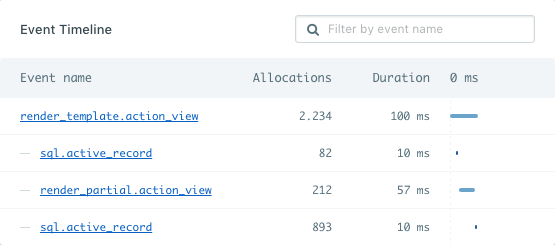
<img src="https://mintcdn.com/appsignal-715f5a51/nF8c1Rwq1cS7b5hg/assets/images/screenshots/app_performance_sample_timeline_1.png?fit=max&auto=format&n=nF8c1Rwq1cS7b5hg&q=85&s=5d66c763209a2fa1e9e04252e792d566" alt="Default event tree" width="555" height="245" data-path="assets/images/screenshots/app_performance_sample_timeline_1.png" />

That's already very useful, but wouldn't it be great if we could see
measurements of specific pieces of code you suspect might influence your
performance? Well, you can!

By adding custom instrumentation we can create more detailed breakdowns of a request and background job. There are two ways of instrumenting your code. With AppSignal instrumentation helpers or with ActiveSupport Notifications instrumentation, as is used by Rails.
<Tip>
  **Note**: Make sure you've [integrated
  AppSignal](/ruby/instrumentation/integrating-appsignal) before adding
  custom instrumentation to your application if it's not automatically
  integrated by one of our supported [integrations](/ruby/integrations).
  Follow our [instrumentation for scripts and background jobs
  guide](/ruby/instrumentation/background-jobs) for applications that we
  don't automatically instrument.
</Tip>

<Tip>
  **Note**: This page only describes how to add performance instrumentation to
  your code. To track errors please read our [exception
  handling](/ruby/instrumentation/exception-handling) guide.
</Tip>

## Instrumentation helpers

<Compatibility versions={[{ name: "AppSignal for Ruby", version: "1.3.0" }]} />

When you add custom instrumentation to your code you'll be able to receive even
more insights into your application. For example, you have to work with an
external API that fetches articles for your homepage:

<CodeGroup>
  ```ruby Ruby theme={null}
  class ArticleFetcher
    def self.fetch(category)
      Appsignal.instrument('fetch.article_fetcher') do
        # Download and process the articles
      end
    end
  end

  ArticleFetcher.fetch('Latest news')
  ```
</CodeGroup>

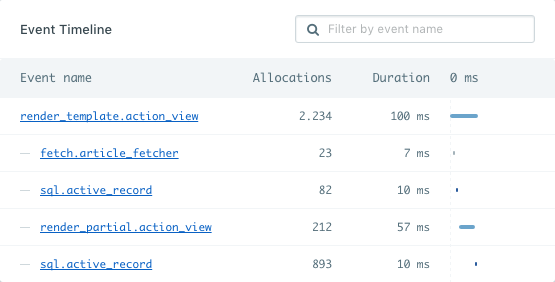
Once you add custom instruments like this AppSignal will start picking them up
and will show you how much time both an event group (`article_fetcher` in this
case) and individual events took.

<img src="https://mintcdn.com/appsignal-715f5a51/nF8c1Rwq1cS7b5hg/assets/images/screenshots/app_performance_sample_timeline_2.png?fit=max&auto=format&n=nF8c1Rwq1cS7b5hg&q=85&s=d32f6f6efe5cce3991168d0fe9f06a77" alt="Event tree with fetcher" width="555" height="282" data-path="assets/images/screenshots/app_performance_sample_timeline_2.png" />

In this case you'll notice that this API call is a huge influence on the
performance of our homepage, which was hidden before. We might want to consider
caching the articles.

<Tip>
  **Note**: The name of the event you're instrumenting is important for our
  processor. Read more about [event naming](/api/event-names).
</Tip>

### Nesting instrumentation

You can use as many instruments in any combination you like. You can
nest instrument calls and AppSignal will handle the nesting and aggregates of
the measurements nicely. You just have to keep the final segment (after the last
dot) of the key consistent.

<CodeGroup>
  ```ruby Ruby theme={null}
  Appsignal.instrument('fetch.article_fetcher') do
    10.times do
      Appsignal.instrument('fetch_single_article.article_fetcher') do
        # Fetch single article
      end
    end
  end
  ```
</CodeGroup>

### Collecting more data per event

By default AppSignal will collect the duration of an event and send it to our
servers. Since custom instrumentation is not hooked up to any framework
internals you might need to pass along more data if you want event details to
show up in AppSignal. This can be a descriptive title, or more specific
information like the query from a database call. We already do this for
ActiveRecord, Sequel, Redis, MongoDB, Sinatra, Grape,
[and more](/ruby/integrations).

There are two helpers to allow you to instrument your code with AppSignal.

<CodeGroup>
  ```ruby Ruby theme={null}
  Appsignal.instrument(name, title = nil, body = nil, body_format = Appsignal::EventFormatter::DEFAULT, &block)
  # and
  Appsignal.instrument_sql(name, title = nil, body = nil, &block)
  ```
</CodeGroup>

#### `name` argument

The name of the event that will appear in the event tree in AppSignal.
Read more about [event key naming](/api/event-names).

#### `title` argument

A more descriptive title of an event, such as `"Fetch current user"` or `"Fetch blog post comments"`. It will appear next to the event name in the event tree
on the performance sample page to provide a little more context on what's
happening.

<CodeGroup>
  ```ruby Ruby theme={null}
  Appsignal.instrument('fetch.custom_database', 'Fetch current user') do
    # ...
  end
  ```
</CodeGroup>

#### `body` argument

More details such as a database query that was used by the event.

<CodeGroup>
  ```ruby Ruby theme={null}
  sql = 'SELECT * FROM posts ORDER BY created_at DESC LIMIT 1'
  Appsignal.instrument('fetch.custom_database', 'Fetch latest post', sql) do
    # ...
  end
  ```
</CodeGroup>

<Warning>
  **Warning**: Please make sure the body payloads are sanitized
  (sensitive/dynamic data is removed). Non-sanitized body events will be
  discarded if they reach a certain limit.
</Warning>

Good:

<CodeGroup>
  ```ruby Ruby theme={null}
  Appsignal.instrument('custom.instrument', 'Instrument stuff', 'command/dynamic/?') do
    # ...
  end
  Appsignal.instrument('custom.instrument', 'Instrument stuff', 'command/dynamic/?') do
    # ...
  end
  ```
</CodeGroup>

Bad:

<CodeGroup>
  ```ruby Ruby theme={null}
  Appsignal.instrument('custom.instrument', 'Instrument stuff', 'command/dynamic/123') do
    # ...
  end
  Appsignal.instrument('custom.instrument', 'Instrument stuff', 'command/dynamic/234') do
    # ...
  end
  ```
</CodeGroup>

When passing in an SQL query as the body, you can use `body_format = Appsignal::EventFormatter::SQL_BODY_FORMAT` to do so.

#### `body_format` argument

Body format supports formatters to scrub the given data in the `body` argument
to remove any sensitive data from the value. There are currently two supported
values for the `body_format` argument.

##### `Appsignal::EventFormatter::DEFAULT` value

The `Appsignal::EventFormatter::DEFAULT` is the default value of this
argument. By default AppSignal will leave the value intact and not scrub any
data from it.

##### `Appsignal::EventFormatter::SQL_BODY_FORMAT` value

The `Appsignal::EventFormatter::SQL_BODY_FORMAT` value will run your data
through the SQL sanitizer and scrub any values in SQL queries.

We recommend you use the `Appsignal.instrument_sql` helper for this instead.

<CodeGroup>
  ```sql SQL theme={null}
  SELECT * FROM users WHERE email = 'hector@appsignal.com' AND password = 'iamabot'
  -- becomes
  SELECT * FROM users WHERE email = ? AND password = ?
  ```
</CodeGroup>

## ActiveSupport::Notifications

<Tip>
  In older versions of the AppSignal gem (1.2 and lower) the
  `Appsignal.instrument` is not available. If you cannot upgrade, it's still
  possible to use `ActiveSupport::Notifications` instead. If you don't want to
  use the `Appsignal.instrument` helper, but instead want to use
  `ActiveSupport::Notifications`, you can still do so in AppSignal for Ruby gem
  1.3 and higher too.
</Tip>

The method for instrumenting your code using `ActiveSupport::Notifications`
is very similar to how AppSignal does it. Using the article fetcher example
again you can see the differences are quite small.

Also see our documentation on AppSignal [event formatters](/ruby/instrumentation/event-formatters) when using `ActiveSupport::Notifications`.
For more information about ActiveSupport::Notifications instrumentation, see the official Rails [`ActiveSupport::Notifications` documentation](http://api.rubyonrails.org/classes/ActiveSupport/Notifications.html).

<CodeGroup>
  ```ruby Ruby theme={null}
  require "active_support"

  class ArticleFetcher
    def self.fetch(category)
      ActiveSupport::Notifications.instrument("fetch.article_fetcher") do
        # Download and process the articles
      end
    end
  end

  ArticleFetcher.fetch("Latest news")
  ```
</CodeGroup>

It works for nested instrumentation calls as well.

<CodeGroup>
  ```ruby Ruby theme={null}
  require "active_support"

  ActiveSupport::Notifications.instrument("fetch.article_fetcher") do
    10.times do
      ActiveSupport::Notifications.instrument("fetch_single_article.article_fetcher") do
        # Fetch single article
      end
    end
  end
  ```
</CodeGroup>

`ActiveSupport::Notifications` is highly flexible, you can instrument your code
any way you like. More information about `ActiveSupport::Notifications` can be
found in the
[Rails API docs](http://api.rubyonrails.org/classes/ActiveSupport/Notifications.html).

<Warning>
  **Warning**: We do not track private `ActiveSupport::Notifications` events
  that start with an exclamation mark (`!`). These events mostly include private
  events generated by Rails.
</Warning>
