> ## Documentation Index
> Fetch the complete documentation index at: https://docs.appsignal.com/llms.txt
> Use this file to discover all available pages before exploring further.
# Python Custom Instrumentation
Including custom instrumentation in your application can be helpful when identifying the specific lines of code causing performance problems.
AppSignal for Python uses OpenTelemetry tracer objects; you can read more about Python traces in OpenTelemetry's [Python Cookbook][cookbook].
Traces are made of one or many spans. A Trace can be thought of as a directed acyclic graph (DAG) of spans:
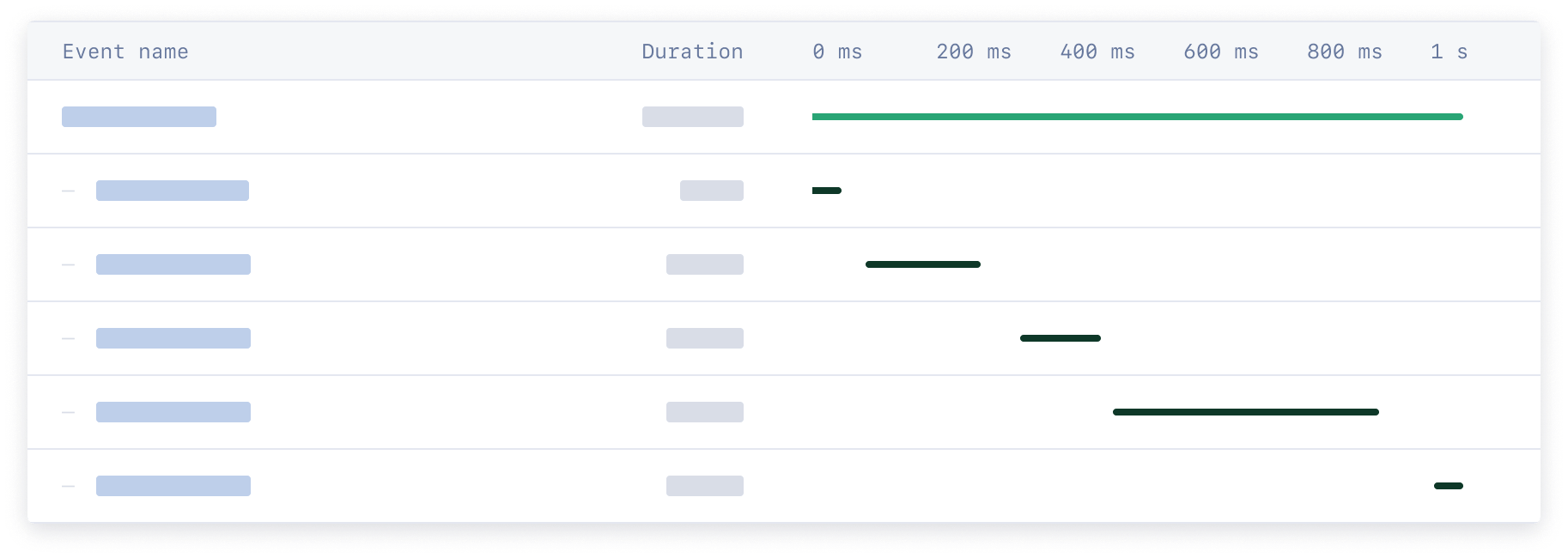 AppSignal specific attributes must be added to a span in order for it to be successfully parsed by AppSignal. Our set of [helper methods](#helper-methods) can be used to set these attributes.
This documentation will explain how to create custom instrumentations by setting AppSignal specific attributes in your Python application's spans.
## Creating a span
When adding custom instrumentation, first import the OpenTelemetry trace module in the file you want to add instrumentation to.
```python Python theme={null}
from opentelemetry import trace
```
Then, using that trace module, create a new span:
```python Python theme={null}
tracer = trace.get_tracer(__name__)
with tracer.start_as_current_span("Span name"):
# Here you can execute your app logic
# And set AppSignal span details:
from appsignal import set_category
set_category("category.name")
```
Once you've retrieved the Span, you can use our [helper methods](#helper-method) to assign the required attributes.
More information about creating and getting Spans is available in [OpenTelemetry's Python Cookbook][cookbook].
## One offs and Serverless
When running one-off scripts or serverless functions, you need to manually initialize AppSignal and stop it at the end to ensure no data is lost. The `stop` helper will gracefully kill the agent process and wait a while to ensure all data is sent to the AppSignal servers.
```python Python theme={null}
appsignal = Appsignal(
active=True,
name="My Python App",
push_api_key="YOUR_PUSH_API_KEY",
)
appsignal.start()
# Your code here along with the instrumentation
# ...
appsignal.stop()
```
## Helper methods
The helper methods described in this section are not compatible with the
[AppSignal collector](/python/configuration/collector).
The following helper methods set AppSignal specific attributes on spans that help group spans and improve how they're displayed in AppSignal. Other attributes are not supported on spans by AppSignal.
### `set_category`
The span category is the name that appears in the performance event timeline for traces. It's also used to group spans together to create a breakdown per group on the sample detail page.
```python Python theme={null}
from appsignal import set_category
set_category("category.name")
set_category("query.users")
set_category("update.users")
set_category("view.users")
```
The category is a string containing the child span event and group. The category should use a dot (`.`) to express the hierarchical inheritance of the event, with the highest unit last. For more information on span categories, please see the [event names guide](/api/event-names).
### `set_name`
More details can be added to the span that are visible when hovering over the event in the event timeline. The span name is used to provide more information about the event, such as "Fetch users", the database from which they are fetched or the URL that was requested.
```python Python theme={null}
from appsignal import set_name
set_name("Fetch users")
```
If this method is not called, it will use the value with which `start_as_current_span` was called.
### `set_body`
🔐 Do not send Personal Identifiable Information (PII) to AppSignal. Filter PII (e.g., names, emails) and use an ID, hash, or pseudonymized identifier instead.
AppSignal specific attributes must be added to a span in order for it to be successfully parsed by AppSignal. Our set of [helper methods](#helper-methods) can be used to set these attributes.
This documentation will explain how to create custom instrumentations by setting AppSignal specific attributes in your Python application's spans.
## Creating a span
When adding custom instrumentation, first import the OpenTelemetry trace module in the file you want to add instrumentation to.
```python Python theme={null}
from opentelemetry import trace
```
Then, using that trace module, create a new span:
```python Python theme={null}
tracer = trace.get_tracer(__name__)
with tracer.start_as_current_span("Span name"):
# Here you can execute your app logic
# And set AppSignal span details:
from appsignal import set_category
set_category("category.name")
```
Once you've retrieved the Span, you can use our [helper methods](#helper-method) to assign the required attributes.
More information about creating and getting Spans is available in [OpenTelemetry's Python Cookbook][cookbook].
## One offs and Serverless
When running one-off scripts or serverless functions, you need to manually initialize AppSignal and stop it at the end to ensure no data is lost. The `stop` helper will gracefully kill the agent process and wait a while to ensure all data is sent to the AppSignal servers.
```python Python theme={null}
appsignal = Appsignal(
active=True,
name="My Python App",
push_api_key="YOUR_PUSH_API_KEY",
)
appsignal.start()
# Your code here along with the instrumentation
# ...
appsignal.stop()
```
## Helper methods
The helper methods described in this section are not compatible with the
[AppSignal collector](/python/configuration/collector).
The following helper methods set AppSignal specific attributes on spans that help group spans and improve how they're displayed in AppSignal. Other attributes are not supported on spans by AppSignal.
### `set_category`
The span category is the name that appears in the performance event timeline for traces. It's also used to group spans together to create a breakdown per group on the sample detail page.
```python Python theme={null}
from appsignal import set_category
set_category("category.name")
set_category("query.users")
set_category("update.users")
set_category("view.users")
```
The category is a string containing the child span event and group. The category should use a dot (`.`) to express the hierarchical inheritance of the event, with the highest unit last. For more information on span categories, please see the [event names guide](/api/event-names).
### `set_name`
More details can be added to the span that are visible when hovering over the event in the event timeline. The span name is used to provide more information about the event, such as "Fetch users", the database from which they are fetched or the URL that was requested.
```python Python theme={null}
from appsignal import set_name
set_name("Fetch users")
```
If this method is not called, it will use the value with which `start_as_current_span` was called.
### `set_body`
🔐 Do not send Personal Identifiable Information (PII) to AppSignal. Filter PII (e.g., names, emails) and use an ID, hash, or pseudonymized identifier instead.
For HIPAA-covered entities, more info on signing a Business Associate Agreement (BAA) is available in our Business Add-Ons documentation.
The span's body can include additional information about the event, like the HTTP request, the connected host, etc. Be sure to sanitize the information before adding it to the span so no Personal Identifiable Information is sent to AppSignal. This information will be visible for the span when hovering over the event timeline.
To store SQL queries in the span's body, please use the [`set_sql_body` helper](#set_sql_body) instead.
```python Python theme={null}
from appsignal import set_body
set_body("Span body")
```
### `set_sql_body`
Available since Python package 0.3.2.
Set a SQL query as the body of the span as it appears in the performance event timeline in the incident sample detail view. This is similar to the [`set_body` helper](#set_body), but is specialized for SQL queries. Any SQL query set as the body with this attribute will be sanitized to avoid sending PII (Personal Identifiable Information) data to our servers.
See the [`set_body` helper](#set_body) for more details on how the body attribute works.
When both the `set_body` and `set_sql_body` helpers are called on the same span, the `set_sql_body` helper's value is leading and the `set_body` helper's value will be ignored.
```python Python theme={null}
from appsignal import set_sql_body
set_body("SELECT * FROM users")
```
### `set_root_name`
This attribute applies to the entire trace. It can be set on a child span, and does not need to be set on the uppermost parent span. This attribute can only be set once per trace. If it is set multiple times, only the attribute from one span in the trace is applied.
Every trace is grouped under an HTTP endpoint, background job worker name, or task name. We call this group the "action name". To change this action name for the entire trace, use the `set_root_name` helper.
Use an action name generic enough to group all traces from this part of the app, while not reporting different names every time. Set `GET /users/:id` (where `:id` the URL parameter name) as the action name, instead of `GET /users/123` (where `123` is the actual value made in the request). The latter would report a new incident for every unique request.
```python Python theme={null}
from appsignal import set_root_name
set_root_name("GET /custom")
# With URL parameters
set_root_name("GET /users/:id")
```
#### Example Use Case
Your application has an endpoint called `GET /coffee`.
```python Python theme={null}
def coffee(request):
return render(request, "coffee.html", {})
```
All requests to this endpoint will generate samples called `GET /coffee`, but your endpoint handles multiple actions: `coffee?action=buy`, and `coffee?action=sell`.
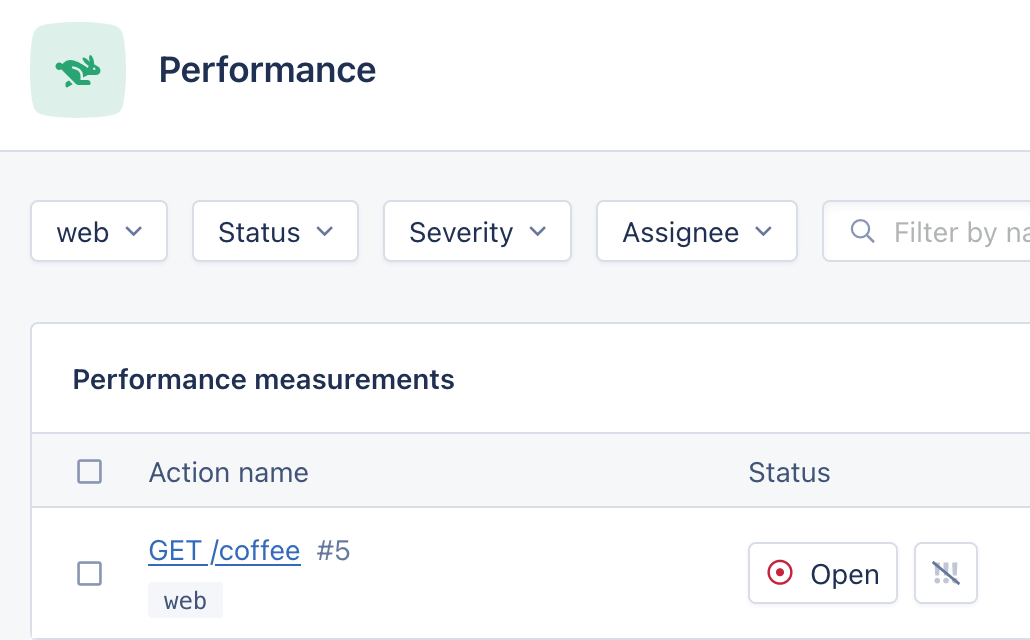 While they all use the `GET /coffee` endpoint, they are conceptually very different and so it would make sense for them to be grouped separately in AppSignal rather than in the same `GET /coffee` sample. To do this, you can use the `set_root_name` helper:
```python Python theme={null}
from appsignal import set_root_name
def coffee(request):
if request.GET.action == "buy":
set_root_name("Buy coffee")
# Buy coffee...
elif request.GET.action == "sell":
set_root_name("Sell coffee")
# Sell coffee...
return render(request, "coffee.html", {})
```
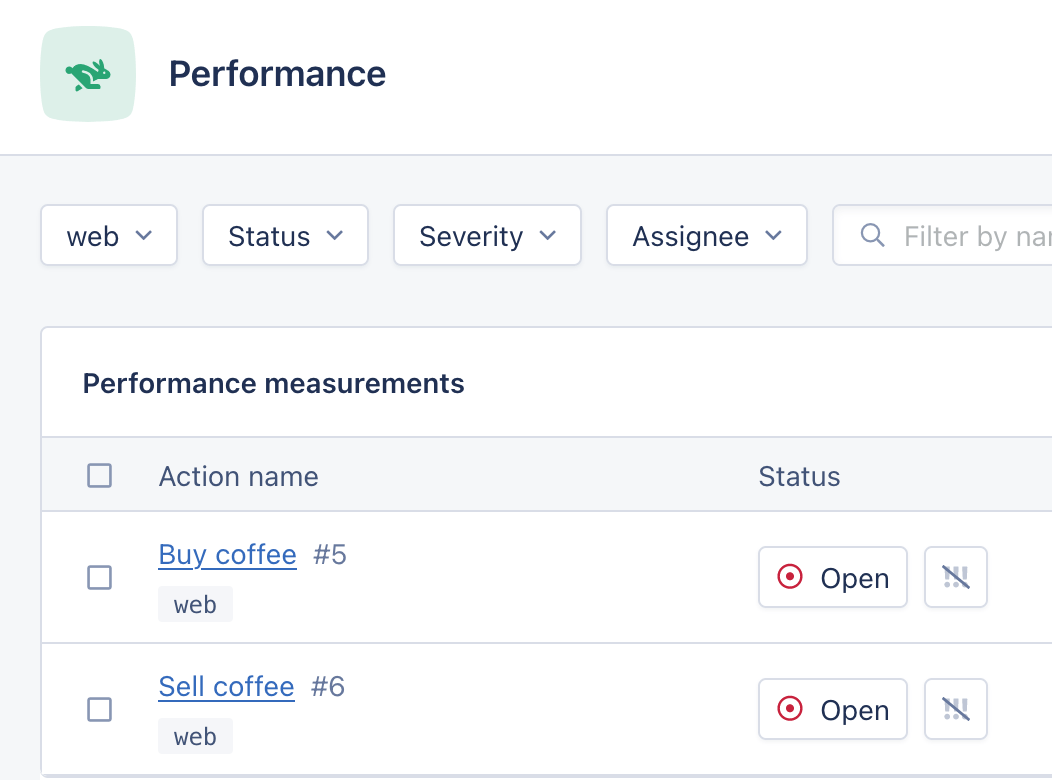
Using `set_root_name` will change the name of the root span, grouping the samples for the requests `coffee?action=buy` and `coffee?action=sell` into separate actions:
While they all use the `GET /coffee` endpoint, they are conceptually very different and so it would make sense for them to be grouped separately in AppSignal rather than in the same `GET /coffee` sample. To do this, you can use the `set_root_name` helper:
```python Python theme={null}
from appsignal import set_root_name
def coffee(request):
if request.GET.action == "buy":
set_root_name("Buy coffee")
# Buy coffee...
elif request.GET.action == "sell":
set_root_name("Sell coffee")
# Sell coffee...
return render(request, "coffee.html", {})
```
Using `set_root_name` will change the name of the root span, grouping the samples for the requests `coffee?action=buy` and `coffee?action=sell` into separate actions:
 ## Other trace data
To customize the data stored on the trace even further, please see our [Tagging](/guides/tagging) and [Data Customization](/guides/custom-data) guides to add tags, parameters, session data, custom data and more.
[cookbook]: https://opentelemetry.io/docs/instrumentation/python/cookbook/
## Other trace data
To customize the data stored on the trace even further, please see our [Tagging](/guides/tagging) and [Data Customization](/guides/custom-data) guides to add tags, parameters, session data, custom data and more.
[cookbook]: https://opentelemetry.io/docs/instrumentation/python/cookbook/