> ## Documentation Index
> Fetch the complete documentation index at: https://docs.appsignal.com/llms.txt
> Use this file to discover all available pages before exploring further.

# Oban

export const VersionRequirements = ({versions = []}) => {
  if (!Array.isArray(versions) || versions.length === 0) {
    return null;
  }
  const boundaries = {
    upper: " or lower",
    exact: "",
    lower: " or higher"
  };
  const containerStyle = {
    marginTop: "0.5rem",
    marginBottom: "1.5rem"
  };
  const lineStyle = {
    display: "block",
    margin: "0 0 0.35rem 0",
    fontSize: "0.875rem",
    lineHeight: "1.4"
  };
  const pillBaseStyle = {
    display: "inline-block",
    padding: "0.1em 0.4em",
    borderRadius: "0.25rem",
    border: "1px solid",
    fontFamily: "ui-monospace, SFMono-Regular, Menlo, monospace",
    fontSize: "0.85em",
    fontWeight: 500
  };
  const pillColors = {
    "AppSignal for Elixir": {
      background: "#f3e8ff",
      borderColor: "#e9d5ff",
      color: "#9333ea"
    },
    "AppSignal for Front-end": {
      background: "#fef9c3",
      borderColor: "#fde68a",
      color: "#ca8a04"
    },
    "AppSignal for Go": {
      background: "#ccfbf1",
      borderColor: "#99f6e4",
      color: "#0d9488"
    },
    "AppSignal for JavaScript": {
      background: "#fef9c3",
      borderColor: "#fde68a",
      color: "#ca8a04"
    },
    "AppSignal for Node.js": {
      background: "#dcfce7",
      borderColor: "#bbf7d0",
      color: "#16a34a"
    },
    "AppSignal for Python": {
      background: "#dbeafe",
      borderColor: "#bfdbfe",
      color: "#2563eb"
    },
    "AppSignal for Ruby": {
      background: "#fee2e2",
      borderColor: "#fecaca",
      color: "#dc2626"
    },
    "AppSignal for Rust": {
      background: "#ffedd5",
      borderColor: "#fed7aa",
      color: "#ea580c"
    }
  };
  const defaultPillColor = {
    background: "#f4f4f5",
    borderColor: "#e4e4e7",
    color: "#52525b"
  };
  const getPillStyle = name => ({
    ...pillBaseStyle,
    ...pillColors[name] || defaultPillColor
  });
  const getBoundText = bound => {
    return boundaries[bound] || boundaries.lower;
  };
  return <div style={containerStyle}>
      {versions.map((v, i) => <p key={`${v.name}-${v.version}-${v.bound || "lower"}-${i}`} style={lineStyle}>
          This feature requires{" "}
          <code style={getPillStyle(v.name)}>{v.name}</code> version {v.version}
          {getBoundText(v.bound)}.
        </p>)}
    </div>;
};

<VersionRequirements
  versions={[
{ name: "AppSignal for Elixir", version: "2.5.0" },
{ name: "Oban", version: "2.0" }
]}
/>

Het AppSignal voor Elixir-pakket instrumenteert jobs die worden uitgevoerd door [Oban](https://oban.pro)-workers en verzamelt metrics over de performance van uw jobs.

Oban is een systeem voor job-queueing en -verwerking voor Elixir, gebaseerd op PostgreSQL en Ecto. U kunt Oban gebruiken om jobs in te plannen om in de achtergrond te draaien.

## Automatische instrumentatie

Oban-ondersteuning wordt automatisch geïnstrumenteerd, zonder dat er configuratie nodig is.

Om de Oban-instrumentatie uit te schakelen, stelt u [de configuratieoptie `instrument_oban`](/elixir/configuration/options#option-instrument_oban) in op `false`.

<Note>
  🔎 De configuratieoptie `instrument_oban` is toegevoegd in versie `2.5.1` van de
  AppSignal voor Elixir-integratie.
</Note>

## Foutrapportage

Standaard creëert de Oban-instrumentatie een foutsample wanneer een van uw workers er niet in slaagt een job te verwerken, hetzij door een `{:error, _}`-tuple te retourneren, hetzij door een uitzondering op te werpen.

Als u alleen fouten naar AppSignal wilt sturen wanneer de fout ertoe leidt dat de job wordt weggegooid, dat wil zeggen zodra het maximum aantal opnieuw-proberen is bereikt, stel dan [de configuratieoptie `report_oban_errors`](/elixir/configuration/options#option-report_oban_errors) in op `"discard"`. Stel deze in op `"none"` om nooit Oban-jobfouten naar AppSignal te sturen.

<Tip>
  De configuratieoptie `report_oban_errors` is toegevoegd in versie `2.5.1` van de
  AppSignal voor Elixir-integratie.

  Bij gebruik van Oban-versie `2.3.1` of lager is de informatie over de status van
  de job niet beschikbaar en gedraagt de optie `"discard"` zich als
  `"all"`.
</Tip>

## Performance- en error samples

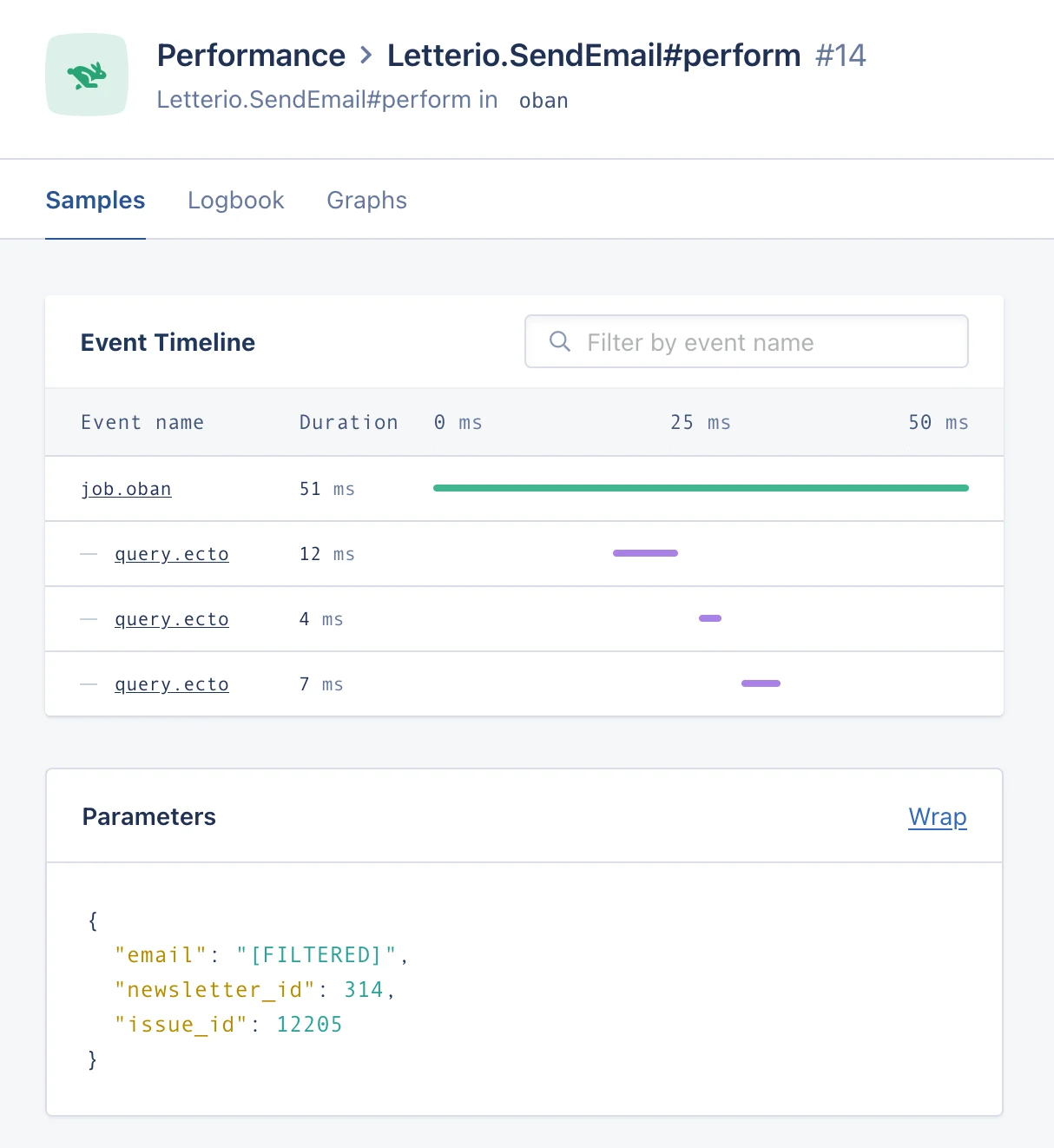
AppSignal creëert performance samples van jobs die door uw Oban-workers worden uitgevoerd:

<img src="https://mintcdn.com/appsignal-715f5a51/nF8c1Rwq1cS7b5hg/assets/images/screenshots/elixir/integrations/oban/performance-sample.png?fit=max&auto=format&n=nF8c1Rwq1cS7b5hg&q=85&s=621798315f06965a7add76e3394e2951" alt="Performance sample van een Oban-jobuitvoering" width="1214" height="1322" data-path="assets/images/screenshots/elixir/integrations/oban/performance-sample.png" />

Het rapporteert ook fouten die ervoor zorgen dat uw workers falen tijdens het verwerken van een job:
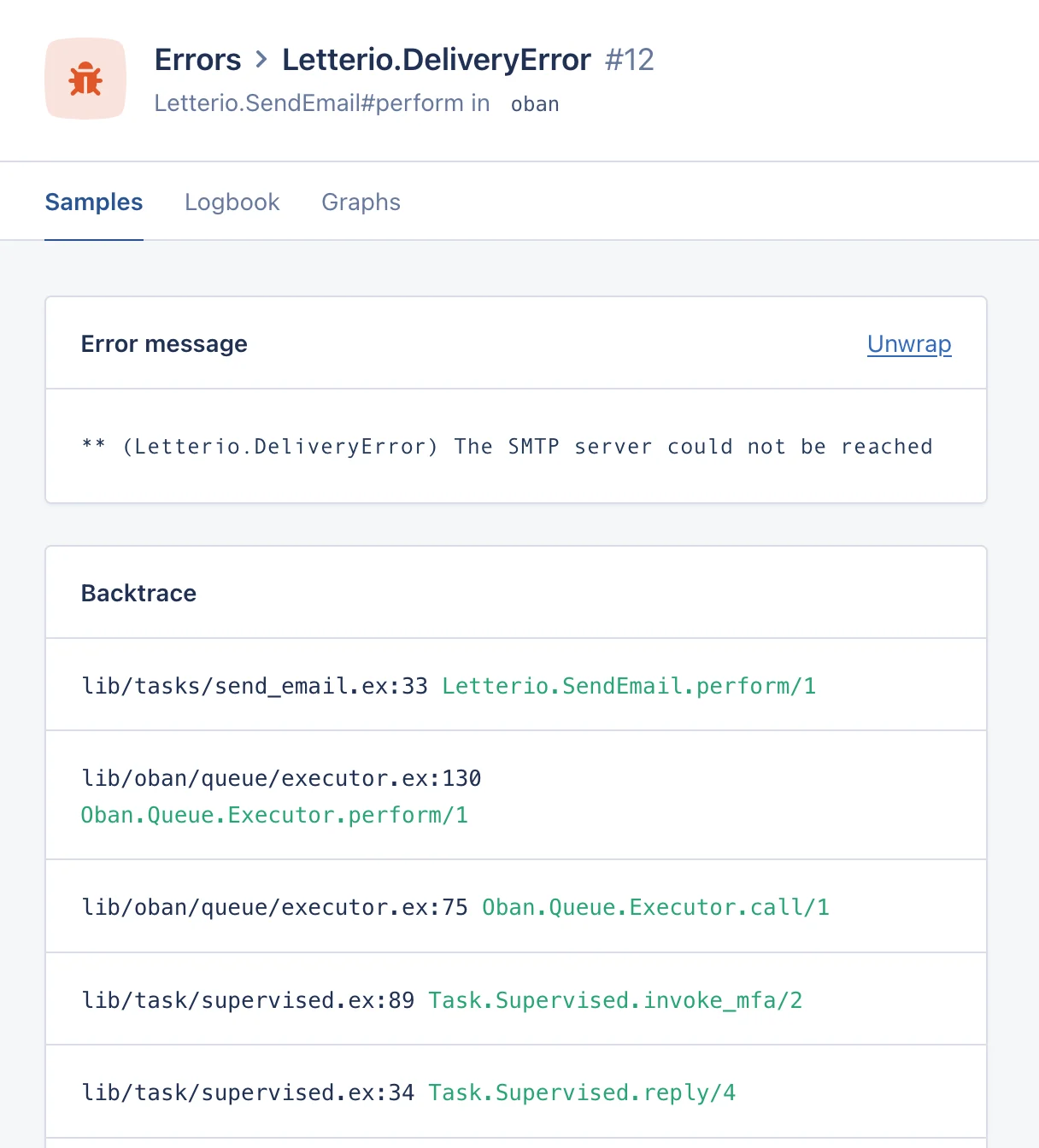
<img src="https://mintcdn.com/appsignal-715f5a51/nF8c1Rwq1cS7b5hg/assets/images/screenshots/elixir/integrations/oban/error-sample.png?fit=max&auto=format&n=nF8c1Rwq1cS7b5hg&q=85&s=5f3981d36741d877d13392bb7ece39ed" alt="Error sample van een Oban-jobuitvoering" width="1216" height="1344" data-path="assets/images/screenshots/elixir/integrations/oban/error-sample.png" />

Binnen de performance- en error samples bevatten de tags informatie over de job:

* Job-ID, queue, worker en priority
* Aantal eerdere pogingen
* Jobstatus en resultaat na uitvoering

Eventuele tags of metadata-waarden die aan de job worden toegevoegd, zullen ook als tags in de sample aanwezig zijn, zodat u de samples voor een specifieke tag kunt filteren.

U kunt ook zien wanneer een Oban-job wordt ingevoegd in de event timeline van de performance samples van uw applicatie:
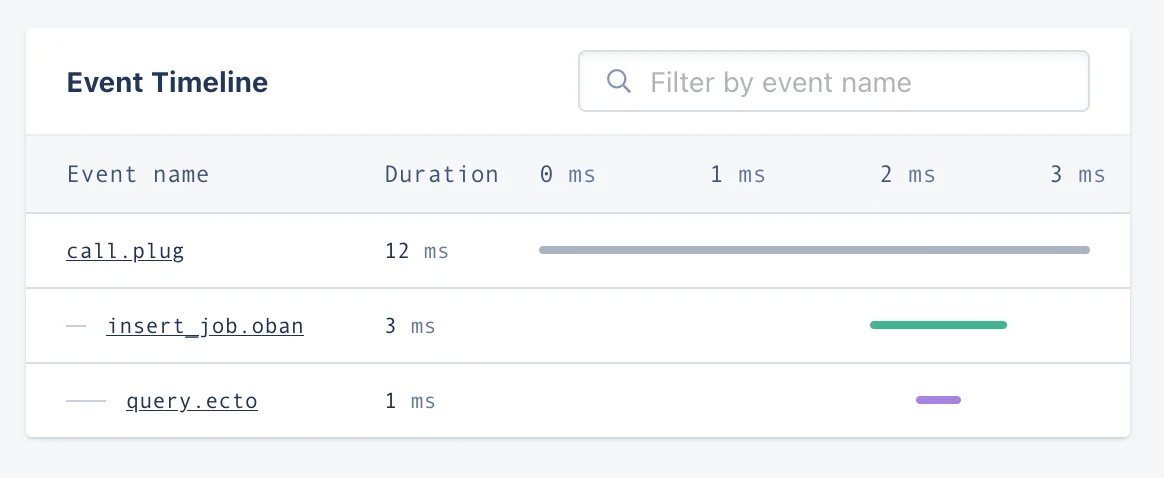
<img src="https://mintcdn.com/appsignal-715f5a51/nF8c1Rwq1cS7b5hg/assets/images/screenshots/elixir/integrations/oban/event-timeline.png?fit=max&auto=format&n=nF8c1Rwq1cS7b5hg&q=85&s=4ba7ea26be30b29287edeef6b0e53545" alt="Event timeline met een Oban-jobinvoeging" width="1164" height="478" data-path="assets/images/screenshots/elixir/integrations/oban/event-timeline.png" />

<Note>
  🔎 Sommige functies zijn alleen beschikbaar in bepaalde Oban-versies:

  * **2.1.0+:** Tags
  * **2.3.1+:** Metadata-waarden en job priority
  * **2.4.0+:** Jobstatus na uitvoering
  * **2.5.0+:** Jobresultaat na uitvoering
  * **2.11.0+:** Job-invoegingsevent

  Om gebruik te maken van alle hierboven beschreven functies, upgrade naar de nieuwste Oban-versie.
</Note>

## Metrics

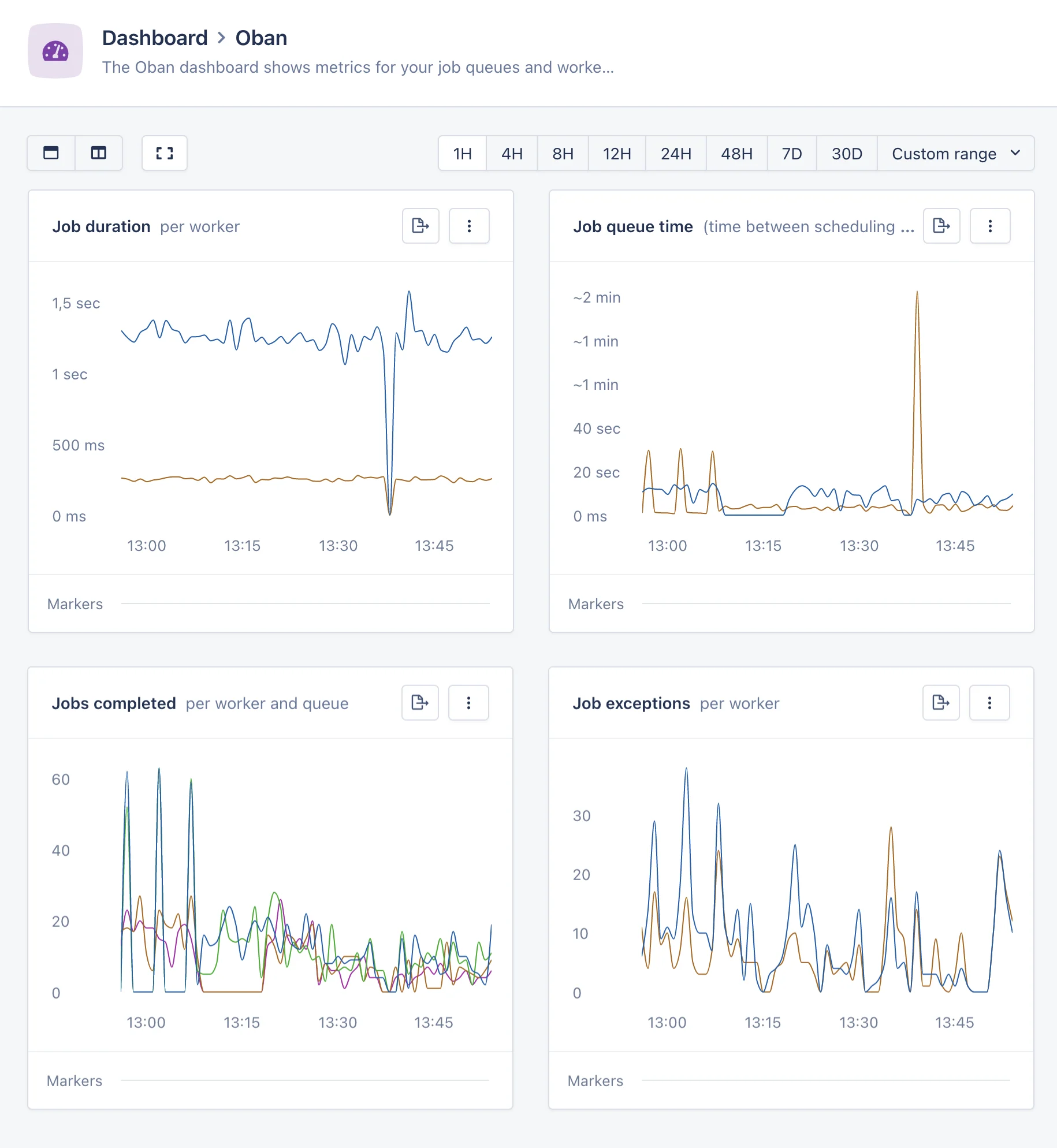
Naast de performance- en error samples verzamelt AppSignal voor Elixir metrics over de performance van uw Oban-jobs:

* `oban_job_duration`: de duur van de verwerkte jobs, getagd met de worker, queue en status van de job.

* `oban_job_queue_time`: de tijd die jobs in de queue hebben doorgebracht, getagd met queue.

* `oban_job_count`: het aantal verwerkte jobs, getagd met de worker, queue en status van de job.

Met behulp van deze metrics maakt AppSignal automatisch het Oban magic dashboard aan, dat belangrijke inzichten biedt in de performance van uw Oban-systeem:

<img src="https://mintcdn.com/appsignal-715f5a51/nF8c1Rwq1cS7b5hg/assets/images/screenshots/elixir/integrations/oban/magic-dashboard.png?fit=max&auto=format&n=nF8c1Rwq1cS7b5hg&q=85&s=9772c0b582e542ca48ef609f26b96037" alt="Magic dashboard met belangrijke Oban-metrics" width="1830" height="1988" data-path="assets/images/screenshots/elixir/integrations/oban/magic-dashboard.png" />
