> ## Documentation Index
> Fetch the complete documentation index at: https://docs.appsignal.com/llms.txt
> Use this file to discover all available pages before exploring further.
# Log Query Syntax
This page describes our newest query syntax. For the syntax using
`attributes`, see our [legacy query syntax](/logging/legacy-query-syntax)
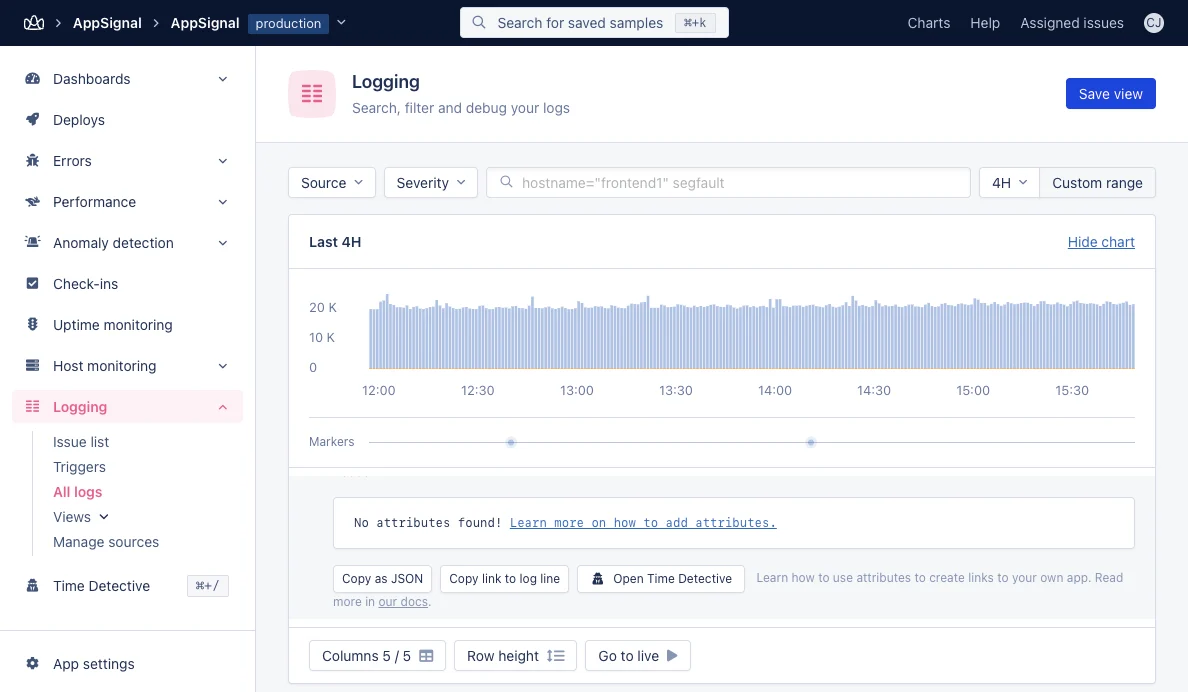
AppSignal's log filtering system allows you to search and filter through your application logs using an intuitive query syntax. Whether you need to find specific error messages, filter by severity levels, or search through custom attributes, our query language makes it easy to pinpoint exactly what you're looking for.
 ## Quick Start
Get started with these simple queries:
```sql SQL theme={null}
timeout
```
Searches for "timeout" in the message field.
```sql SQL theme={null}
severity=error
```
Finds all error-level logs.
```sql SQL theme={null}
severity=error hostname=production-web-1
```
Finds errors from a specific server.
## Available Fields
You can query the following fields in your logs:
| Field | Description | Example |
| ----------------- | ---------------------------------------------- | ------------------------- |
| `severity` | Log level (error, warning, info, debug, trace) | `severity=error` |
| `hostname` | Application host | `hostname=production-1` |
| `group` | Namespace defined for your application | `group="background jobs"` |
| `message` | Log message content | `message:timeout` |
| Custom attributes | Any custom attribute defined in your logs | `duration>10.1` |
If no field is provided, the query will search the message field.
## Query Operators
### Search Operators
| Operator | Syntax | Description | Example |
| -------- | -------------- | ---------------------- | ----------------- |
| `:` | `field:value` | Contains value | `message:error` |
| `!:` | `field!:value` | Does not contain value | `hostname!:test` |
| `=` | `field=value` | Exact match | `severity=error` |
| `!=` | `field!=value` | Not equal to | `source!=mongodb` |
Use quotes for values with spaces: `group:"background jobs"`
### Comparison Operators
For numeric values:
| Operator | Syntax | Description | Example |
| -------- | ------------------ | ------------------------ | --------------- |
| `>` | `attribute>value` | Greater than | `duration>100` |
| `<` | `attribute=` | `attribute>=value` | Greater than or equal to | `duration>=100` |
| `<=` | `attribute<=value` | Less than or equal to | `user_id<=1000` |
### Nested Attributes
We'll use the following example JSON structure:
```json JSON theme={null}
{
"message": "User logged in",
"group": "admin",
"hostname": "production-1",
"user": {
"id": 123,
"name": "John Doe",
"emails": ["john@example.com", "john@work.com"],
"location.country": "US"
}
}
```
Query nested JSON attributes using dot notation:
```sql SQL theme={null}
user.id=123
```
Access nested object properties.
```sql SQL theme={null}
user.emails.0=john@example.com
```
Query array elements by index (zero-based).
```sql SQL theme={null}
user.location\.country=US
```
Escape dots that are part of the field name itself using a backslash.
## Combining Queries
### AND Logic (Default)
Space-separated queries are combined with AND:
```sql SQL theme={null}
severity=error hostname=production-1
```
Finds errors from production-1.
### OR Logic
Use `OR` to match any condition:
```sql SQL theme={null}
severity=error OR severity=warning
```
Finds errors or warnings.
### Grouping with Parentheses
Use parentheses for complex queries:
```sql SQL theme={null}
severity=error AND (hostname=web-1 OR hostname=web-2)
```
Finds errors from either web-1 or web-2.
## Quick Start
Get started with these simple queries:
```sql SQL theme={null}
timeout
```
Searches for "timeout" in the message field.
```sql SQL theme={null}
severity=error
```
Finds all error-level logs.
```sql SQL theme={null}
severity=error hostname=production-web-1
```
Finds errors from a specific server.
## Available Fields
You can query the following fields in your logs:
| Field | Description | Example |
| ----------------- | ---------------------------------------------- | ------------------------- |
| `severity` | Log level (error, warning, info, debug, trace) | `severity=error` |
| `hostname` | Application host | `hostname=production-1` |
| `group` | Namespace defined for your application | `group="background jobs"` |
| `message` | Log message content | `message:timeout` |
| Custom attributes | Any custom attribute defined in your logs | `duration>10.1` |
If no field is provided, the query will search the message field.
## Query Operators
### Search Operators
| Operator | Syntax | Description | Example |
| -------- | -------------- | ---------------------- | ----------------- |
| `:` | `field:value` | Contains value | `message:error` |
| `!:` | `field!:value` | Does not contain value | `hostname!:test` |
| `=` | `field=value` | Exact match | `severity=error` |
| `!=` | `field!=value` | Not equal to | `source!=mongodb` |
Use quotes for values with spaces: `group:"background jobs"`
### Comparison Operators
For numeric values:
| Operator | Syntax | Description | Example |
| -------- | ------------------ | ------------------------ | --------------- |
| `>` | `attribute>value` | Greater than | `duration>100` |
| `<` | `attribute=` | `attribute>=value` | Greater than or equal to | `duration>=100` |
| `<=` | `attribute<=value` | Less than or equal to | `user_id<=1000` |
### Nested Attributes
We'll use the following example JSON structure:
```json JSON theme={null}
{
"message": "User logged in",
"group": "admin",
"hostname": "production-1",
"user": {
"id": 123,
"name": "John Doe",
"emails": ["john@example.com", "john@work.com"],
"location.country": "US"
}
}
```
Query nested JSON attributes using dot notation:
```sql SQL theme={null}
user.id=123
```
Access nested object properties.
```sql SQL theme={null}
user.emails.0=john@example.com
```
Query array elements by index (zero-based).
```sql SQL theme={null}
user.location\.country=US
```
Escape dots that are part of the field name itself using a backslash.
## Combining Queries
### AND Logic (Default)
Space-separated queries are combined with AND:
```sql SQL theme={null}
severity=error hostname=production-1
```
Finds errors from production-1.
### OR Logic
Use `OR` to match any condition:
```sql SQL theme={null}
severity=error OR severity=warning
```
Finds errors or warnings.
### Grouping with Parentheses
Use parentheses for complex queries:
```sql SQL theme={null}
severity=error AND (hostname=web-1 OR hostname=web-2)
```
Finds errors from either web-1 or web-2.