> ## Documentation Index
> Fetch the complete documentation index at: https://docs.appsignal.com/llms.txt
> Use this file to discover all available pages before exploring further.
# Legacy Log Query Syntax
This query syntax will be deprecated in the future. Go back to our [new query
syntax](/logging/query-syntax). If you like to switch to the new query syntax,
[contact support](mailto:support@appsignal.com).
AppSignal's powerful log filtering system allows you to quickly search and filter through your application logs using an intuitive query syntax. Whether you need to find specific error messages, filter by severity levels, or search through custom attributes, our query language makes it easy to pinpoint exactly what you're looking for in your logs.
Think of it like a search engine for your application's logs. Here's a simple example:
If you want to find all error logs, you can use:
`severity=error`
Or if you want to find logs containing the word "timeout":
`message:timeout`
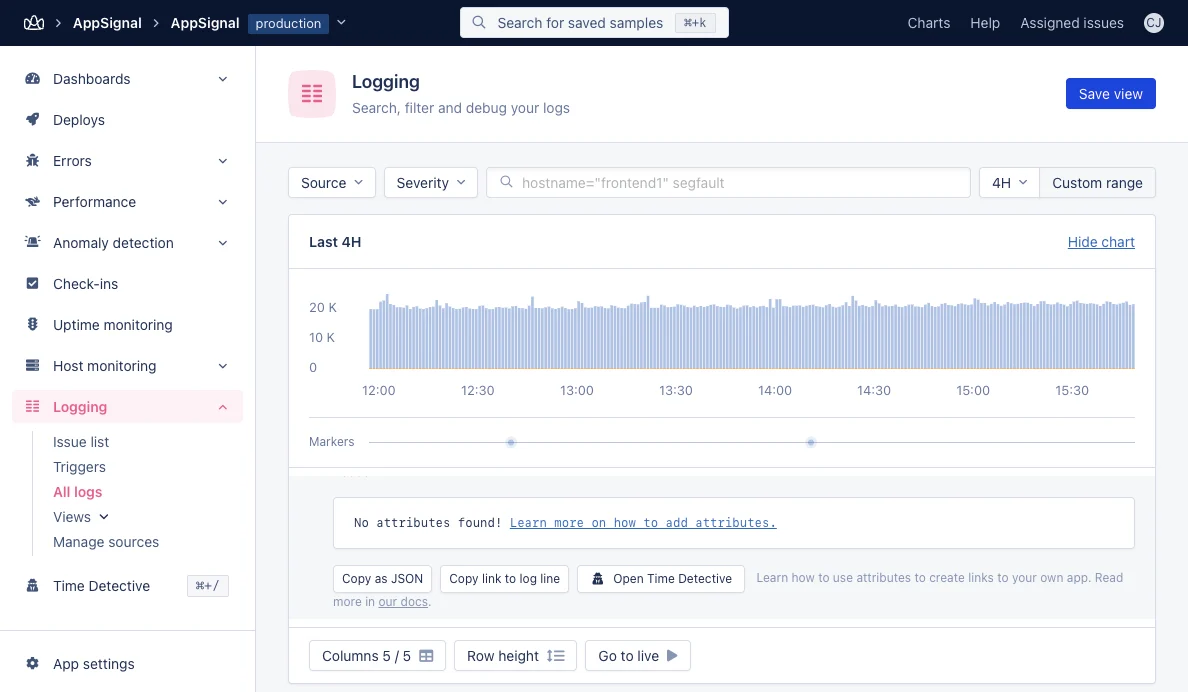 AppSignal supports log filtering by:
| Filter Field | Description | Example Query |
| ------------ | ------------------------------------------------------------------------------- | --------------------------------------------------------------------------- |
| `severity` | Log severity level. Accepted values are: error, warning, info, debug, and trace | `severity=error` |
| `hostname` | Application Host (via search) | `hostname=appsignal` |
| `group` | Namespaces defined for your application (via search) | `group=users` |
| `message` | Log message contents (via search) | `message:error` |
| `attributes` | Attributes defined in your logs (via search) | `attributes.duration_double>10.1` (see [Attribute Types](#attribute-types)) |
## Search Syntax Explained
The below table explains the current AppSignal Logs search query syntax.
Queries can be combined with a space between them (see Combined Queries in [Combining Multiple Queries](#combining-multiple-queries)).
### Search Query Overview
| Query Name | AppSignal Syntax | Description |
| ------------------------------ | -------------------------------------- | ------------------------------------------------------------------------------------------------------------------------------------------------------------------------------------------------ |
| Wildcard | `Foo` | Returns all logs that contain a value like `Foo` |
| Multiple Wildcards | `Foo Bar` | Returns all logs that contain a value like `Foo` and a value like `Bar` |
| Wildcard For Words With Spaces | `"Foo Bar"` | Returns all logs that contain a value like `"Foo Bar"` |
| Field Search | `hostname:foo` | Returns all logs where field hostname is like `Foo` |
| Multiple Word Field Search | `hostname:"foo bar"` | Returns all logs where field hostname is like `"Foo Bar"` |
| Exact Match | `hostname=foo` | Returns all logs where field hostname is `Foo` |
| Exact Query Negation | `hostname!=foo` | Returns all logs where field hostname is not `Foo` |
| Wildcard Query Negation | `hostname!:foo` | Returns all logs where field hostname is not like `Foo` |
| Match any in list | `hostname=[\"frontend1\", frontend2]"` | Returns all logs that match any of the items in the list `["frontend1", "frontend2"]` |
| Match not in list | `group!=[\"app\", unix]"` | Returns all logs that do not match any of the items in the list `["app", "unix"]` |
| Attribute Specific Query | `attributes.attribute_name` | Queries log attributes. Replace `attribute_name` with the attribute you are querying (including its type suffix). You can use any legal AppSignal operator in this table to complete your query. |
| Greater Than | `attributes.duration_double>100` | Returns all logs where `duration` is greater than 100 |
| Less Than | `attributes.duration_double<100` | Returns all logs where `duration` is less than 100 |
### Combining Multiple Queries
You can combine multiple queries by adding them together with spaces.
1. Find logs containing "error":
`message:error`
2. Add filtering for a specific group:
`message:error group="background jobs"`
3. Exclude certain hostnames:
`message:error group="background jobs" hostname!:test-server`
### Attribute Types {/* id: attribute-types */}
When filtering on custom log attributes using comparison operators (`>`, `<`, `>=`, `<=`), you **must** include a type suffix in the attribute name. Without the correct type suffix, the query will fail.
The supported type suffixes are:
| Suffix | Type | Example |
| --------- | ------- | --------------------------------- |
| `_int` | Integer | `attributes.user_id_int>1000` |
| `_double` | Float | `attributes.duration_double>5.65` |
| `_bool` | Boolean | `attributes.success_bool=true` |
| `_string` | String | `attributes.region_string=eu` |
**Important:** Do not include spaces around comparison operators when querying
attributes. For example, use `attributes.duration_double>5.65` — **not**
`attributes.duration_double > 5.65`. Spaces will cause the query to fail.
### Common Use Cases
1. Find all errors from a specific server:
`severity=error hostname=production-web-1`
2. Find slow database queries:
`source=PostgreSQL attributes.duration_double>100.0`
3. Debug failed background jobs:
`group="background jobs" message:failed`
AppSignal supports log filtering by:
| Filter Field | Description | Example Query |
| ------------ | ------------------------------------------------------------------------------- | --------------------------------------------------------------------------- |
| `severity` | Log severity level. Accepted values are: error, warning, info, debug, and trace | `severity=error` |
| `hostname` | Application Host (via search) | `hostname=appsignal` |
| `group` | Namespaces defined for your application (via search) | `group=users` |
| `message` | Log message contents (via search) | `message:error` |
| `attributes` | Attributes defined in your logs (via search) | `attributes.duration_double>10.1` (see [Attribute Types](#attribute-types)) |
## Search Syntax Explained
The below table explains the current AppSignal Logs search query syntax.
Queries can be combined with a space between them (see Combined Queries in [Combining Multiple Queries](#combining-multiple-queries)).
### Search Query Overview
| Query Name | AppSignal Syntax | Description |
| ------------------------------ | -------------------------------------- | ------------------------------------------------------------------------------------------------------------------------------------------------------------------------------------------------ |
| Wildcard | `Foo` | Returns all logs that contain a value like `Foo` |
| Multiple Wildcards | `Foo Bar` | Returns all logs that contain a value like `Foo` and a value like `Bar` |
| Wildcard For Words With Spaces | `"Foo Bar"` | Returns all logs that contain a value like `"Foo Bar"` |
| Field Search | `hostname:foo` | Returns all logs where field hostname is like `Foo` |
| Multiple Word Field Search | `hostname:"foo bar"` | Returns all logs where field hostname is like `"Foo Bar"` |
| Exact Match | `hostname=foo` | Returns all logs where field hostname is `Foo` |
| Exact Query Negation | `hostname!=foo` | Returns all logs where field hostname is not `Foo` |
| Wildcard Query Negation | `hostname!:foo` | Returns all logs where field hostname is not like `Foo` |
| Match any in list | `hostname=[\"frontend1\", frontend2]"` | Returns all logs that match any of the items in the list `["frontend1", "frontend2"]` |
| Match not in list | `group!=[\"app\", unix]"` | Returns all logs that do not match any of the items in the list `["app", "unix"]` |
| Attribute Specific Query | `attributes.attribute_name` | Queries log attributes. Replace `attribute_name` with the attribute you are querying (including its type suffix). You can use any legal AppSignal operator in this table to complete your query. |
| Greater Than | `attributes.duration_double>100` | Returns all logs where `duration` is greater than 100 |
| Less Than | `attributes.duration_double<100` | Returns all logs where `duration` is less than 100 |
### Combining Multiple Queries
You can combine multiple queries by adding them together with spaces.
1. Find logs containing "error":
`message:error`
2. Add filtering for a specific group:
`message:error group="background jobs"`
3. Exclude certain hostnames:
`message:error group="background jobs" hostname!:test-server`
### Attribute Types {/* id: attribute-types */}
When filtering on custom log attributes using comparison operators (`>`, `<`, `>=`, `<=`), you **must** include a type suffix in the attribute name. Without the correct type suffix, the query will fail.
The supported type suffixes are:
| Suffix | Type | Example |
| --------- | ------- | --------------------------------- |
| `_int` | Integer | `attributes.user_id_int>1000` |
| `_double` | Float | `attributes.duration_double>5.65` |
| `_bool` | Boolean | `attributes.success_bool=true` |
| `_string` | String | `attributes.region_string=eu` |
**Important:** Do not include spaces around comparison operators when querying
attributes. For example, use `attributes.duration_double>5.65` — **not**
`attributes.duration_double > 5.65`. Spaces will cause the query to fail.
### Common Use Cases
1. Find all errors from a specific server:
`severity=error hostname=production-web-1`
2. Find slow database queries:
`source=PostgreSQL attributes.duration_double>100.0`
3. Debug failed background jobs:
`group="background jobs" message:failed`