> ## Documentation Index
> Fetch the complete documentation index at: https://docs.appsignal.com/llms.txt
> Use this file to discover all available pages before exploring further.

# Add Tags to a Request

export const Compatibility = ({versions = [], label = "Available in"}) => {
  if (!Array.isArray(versions) || versions.length === 0) {
    return null;
  }
  const defaultPillStyle = {
    borderColor: "#d4d4d8",
    background: "#f4f4f5",
    color: "#3f3f46"
  };
  const pillStyles = {
    "AppSignal for Elixir": {
      background: "#f3e8ff",
      borderColor: "#d8b4fe",
      color: "#6b21a8"
    },
    "AppSignal for Front-end": {
      background: "#fef9c3",
      borderColor: "#fde047",
      color: "#854d0e"
    },
    "AppSignal for Go": {
      background: "#ccfbf1",
      borderColor: "#5eead4",
      color: "#115e59"
    },
    "AppSignal for JavaScript": {
      background: "#fef9c3",
      borderColor: "#fde047",
      color: "#854d0e"
    },
    "AppSignal for Node.js": {
      background: "#dcfce7",
      borderColor: "#86efac",
      color: "#166534"
    },
    "AppSignal for Python": {
      background: "#dbeafe",
      borderColor: "#93c5fd",
      color: "#1e40af"
    },
    "AppSignal for Ruby": {
      background: "#fee2e2",
      borderColor: "#fca5a5",
      color: "#991b1b"
    },
    "AppSignal for Rust": {
      background: "#ffedd5",
      borderColor: "#fdba74",
      color: "#9a3412"
    }
  };
  const getPillStyle = name => ({
    ...defaultPillStyle,
    ...pillStyles[name] || ({})
  });
  return <div className="not-prose my-4 rounded-lg border border-zinc-200 bg-zinc-50 px-4 py-3 text-sm dark:border-white/10 dark:bg-white/5">
      <div className="flex flex-wrap items-center gap-x-2 gap-y-1">
        <span className="font-semibold text-zinc-700 dark:text-zinc-200">
          {label}:
        </span>
        {versions.map((v, i) => <span key={`${v.name}-${v.version}-${i}`} className="inline-flex items-center gap-1 rounded-full border px-2 py-0.5 text-xs font-medium" style={getPillStyle(v.name)}>
            <span>{v.name}</span>
            <span className="opacity-70">
              {v.version}
              {v.exact ? "" : "+"}
            </span>
          </span>)}
      </div>
    </div>;
};

You can use tagging to supply extra context on errors and performance incidents. Tagging can help to add information that is not already part of a request, such as the session data, headers, environment data, or parameters. Tags can also be used to filter on samples within an incident to find all errors for a specific user or slow pages for a particular locale.

You can set tags wherever the current transaction or span is accessible. We recommend calling it before your application code runs in a request, such as a callback. You can see what tags apply to a sample on the [Error and Performance](https://appsignal.com/redirect-to/app?to=performance) incident page.

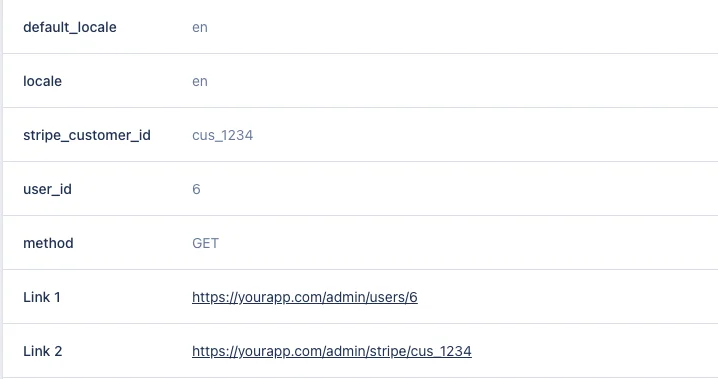
Using [Link Templates](/application/link-templates) it's possible to add links to your application with tag data, such as the admin panel for the signed-in user. You can see this in practice in the below screenshot, with the `Link 1` and `Link 2` tags.
<img src="https://mintcdn.com/appsignal-715f5a51/MS9b5WO71lSfD5jG/assets/images/screenshots/tags/tags.png?fit=max&auto=format&n=MS9b5WO71lSfD5jG&q=85&s=01142180faf7fb0a63eb54549eb76f50" alt="Tag a request" width="718" height="379" data-path="assets/images/screenshots/tags/tags.png" />

<Warning>
  🔐 Do not send <strong>Personal Identifiable Information (PII)</strong> to AppSignal. Filter PII (e.g., names, emails) and use an ID, hash, or pseudonymized identifier instead. <br /> <br /> Use [Link Templates](https://docs.appsignal.com/application/link-templates) to link them back in your app.
</Warning>

## Ruby

With the [AppSignal for Ruby](/ruby) gem, use the `Appsignal.add_tags` helper methods to add tags to error and performance samples. On Ruby gem version 3 and older, use the `Appsignal.set_tags` helper.

You can use `Appsignal.add_tags` wherever an active transaction is accessible, we recommend calling it before your application code runs in the request, such as in a `before_action` using Rails.

<CodeGroup>
  ```ruby Ruby theme={null}
  before_action do
    Appsignal.add_tags(
      :user_id => current_user.id,
      :stripe_customer_id => stripe_customer_id,
      :locale => I18n.locale,
      :default_locale => I18n.default_locale
    )
  end
  ```
</CodeGroup>

### Default tags

<Compatibility versions={[{ name: "AppSignal for Ruby", version: "4.8.3" }]} />

You can configure tags that will be added to all transactions using the [`default_tags` config option](/ruby/configuration/options#option-default_tags). These tags are applied automatically to every transaction. Transaction-specific tags set with `Appsignal.add_tags` will override default tags with the same key.

<CodeGroup>
  ```ruby Ruby theme={null}
  Appsignal.configure do |config|
    config.default_tags = {
      "region" => "europe",
      "shard" => "shard-1"
    }
  end
  ```

  ```yaml YAML theme={null}
  default: &defaults
    default_tags:
      region: europe
      shard: shard-1
  ```

  ```bash Shell theme={null}
  export APPSIGNAL_DEFAULT_TAGS="region=europe,shard=shard-1"
  ```
</CodeGroup>

### Limitations {/* id: ruby-limitations */}

Tags that do not meet these limitations are dropped without warning.

* The tag key must be a String or Symbol.
* The tagged value must be a String, Symbol, Integer or Boolean (true/false).
  * Boolean values are supported in Ruby gem 3.11 and newer.
* The length of the tag value must be less than 256 characters.
* Nested hash values are not supported for tags, please use [custom data](/guides/custom-data/custom-data) instead.

<CodeGroup>
  ```ruby Ruby theme={null}
  # Unsupported: hash value type is not supported
  Appsignal.add_tags(
    :i18n => {
      :locale => I18n.locale,
      :default_locale => I18n.default_locale
    }
  )
  ```
</CodeGroup>

## Elixir

Use the [`Appsignal.Span.set_sample_data`](https://hexdocs.pm/appsignal/Appsignal.Span.html#set_sample_data/2) function to supply extra context on errors and performance samples. Use the `"tags"` sample key for the function to add tags to the span.

<CodeGroup>
  ```elixir Elixir theme={null}
  Appsignal.Span.set_sample_data(
    Appsignal.Tracer.root_span,
    "tags",
    %{
      locale: "en",
      user_id: user_id,
      stripe_customer_id: stripe_customer_id,
      locale: locale,
      default_locale: default_locale
    }
  )
  ```
</CodeGroup>

### Last call is leading

The `set_sample_data` helper can be called multiple times, but only the last value will be retained. When the code is run below:

<CodeGroup>
  ```elixir Elixir theme={null}
  Appsignal.Span.set_sample_data(Appsignal.Tracer.root_span, "tags", %{locale: "en"})
  Appsignal.Span.set_sample_data(Appsignal.Tracer.root_span, "tags", %{user: "bob"})
  Appsignal.Span.set_sample_data(Appsignal.Tracer.root_span, "tags", %{locale: "de"})
  ```
</CodeGroup>

it will result in the following tags being stored:

<CodeGroup>
  ```elixir Elixir theme={null}
  %{
    locale: "de"
  }
  ```
</CodeGroup>

### Setting sample data on a span

To add sample data to a span as soon as it's created, add a `custom_on_create_fun`:

<CodeGroup>
  ```elixir Elixir theme={null}
  defmodule MyApp.Appsignal do
    def custom_on_create_fun(_span) do
      Appsignal.Span.set_sample_data(Appsignal.Tracer.root_span, "tags", %{"locale": "en"})
    end
  end
  ```
</CodeGroup>

Then, add it to your app's configuration:

<CodeGroup>
  ```elixir Elixir theme={null}
  # config/config.exs
  config :appsignal, custom_on_create_fun: &MyApp.Appsignal.custom_on_create_fun/1
  ```
</CodeGroup>

The `custom_on_create_fun` requires AppSignal for Elixir version 2.8.3 or higher.

### Limitations {/* id: elixir-limitations */}

Tags that do not meet these limitations are dropped without warning.

* The tag key must be a `String` or `Atom`.
* The tagged value must be a `String`, `Atom` or `Integer`.
* The length of the tag value must be less than 256 characters.
* Nested map values are not supported for tags, please use [custom data](/guides/custom-data/custom-data) instead.

<CodeGroup>
  ```elixir Elixir theme={null}
  # Unsupported: map value type is not supported
  Appsignal.Span.set_sample_data(
    Appsignal.Tracer.root_span,
    "tags",
    %{
      i18n: %{
        locale: "en_GB",
        default_locale: "en_US"
      }
    }
  )
  ```
</CodeGroup>

## Node.js

Import the `setTag` helper function to add tags to spans for errors and performance samples.

<CodeGroup>
  ```javascript Node.js theme={null}
  import { setTag } from "@appsignal/nodejs";

  setTag("user_id", user_id);
  setTag("stripe_customer_id", stripe_customer_id);
  setTag("locale", locale);
  setTag("default_locale", default_locale);
  ```
</CodeGroup>

### Limitations {/* id: nodejs-limitations */}

Tags that do not meet these limitations are dropped without warning.

* The tag key must be a `String`.
* The tagged value must be a `String`, `Number` or `Boolean`.
* The length of the tag value must be less than 256 characters.
* Nested object values are not supported for tags, please use the [`setCustomData`](/guides/custom-data/custom-data) helper function instead.

<CodeGroup>
  ```javascript Node.js theme={null}
  const tracer = appsignal.tracer();
  const span = tracer.currentSpan();

  # Unsupported: object value type is not supported
  span.set("i18n", { locale: "en_GB", default_locale: "en_US" });
  ```
</CodeGroup>

## Python

Import the `set_tag` helper method to add tags to spans for errors and performance samples.

<CodeGroup>
  ```python Python theme={null}
  from appsignal import set_tag

  set_tag("user_id", user_id)
  set_tag("stripe_customer_id", stripe_customer_id)
  set_tag("locale", locale)
  set_tag("default_locale", default_locale)
  ```
</CodeGroup>

### Limitations {/* id: python-limitations */}

Tags that do not meet these limitations are dropped without warning.

* The tag key must be a String.
* The tagged value must be a String, Integer, Float or Boolean.
* The length of the tag value must be less than 256 characters.
* Nested object values are not supported for tags, please use the [`set_custom_data`](/guides/custom-data/custom-data) helper function instead.

## Go

In a Go app, to add an AppSignal tag to a span on a trace, first fetch the active span or create a new span as described on [our Go custom instrumentation page](/go/custom-instrumentation).

Then, set an attribute on the span using the attribute helper that matches the type of the tag value, see also [the tag limitations below](#go-limitations).

The span attribute name has the following format: `appsignal.tag.<tag name>`. Replace `<tag name>` with the name of the tag.

<CodeGroup>
  ```go Go theme={null}
  // Example format
  span.SetAttributes(attribute.String("appsignal.tag.<tag_name>", "string"))

  // Supported types
  span.SetAttributes(attribute.String("appsignal.tag.my_tag_string", "tag value"))
  span.SetAttributes(attribute.StringSlice("appsignal.tag.my_tag_int64", []string{"abc", "def"}))
  span.SetAttributes(attribute.Bool("appsignal.tag.my_tag_bool_true", true))
  span.SetAttributes(attribute.Bool("appsignal.tag.my_tag_bool_false", false))
  span.SetAttributes(attribute.BoolSlice("appsignal.tag.my_tag_bool_slice", []bool{true, false}))
  span.SetAttributes(attribute.Float64("appsignal.tag.my_tag_float64", 12.34))
  span.SetAttributes(attribute.Float64Slice("appsignal.tag.my_tag_float64_slice", []float64{12.34, 56.78}))
  span.SetAttributes(attribute.Int("appsignal.tag.my_tag_int", 1234))
  span.SetAttributes(attribute.IntSlice("appsignal.tag.my_tag_int", []int{1234, 5678}))
  span.SetAttributes(attribute.Int64("appsignal.tag.my_tag_int64", 1234))
  span.SetAttributes(attribute.Int64Slice("appsignal.tag.my_tag_int64_slice", []int64{1234, 5678}))
  ```
</CodeGroup>

### Limitations {/* id: go-limitations */}

Tags that do not meet these limitations are dropped without warning.

* The tag key must be a String.
* The tagged value must be a String, Integer, Float, Boolean, or a slice of those types.
* The length of the tag value must be less than 256 characters.
* Array values are flattened to comma separated values.
* Nested object values (maps) are not supported for tags.

## Java

In a Java app, to add an AppSignal tag to a span on a trace, first fetch the active span or create a new span as described on [our Java custom instrumentation page](/java/custom-instrumentation).

Then, set an attribute on the span using the `setAttribute` method. The span attribute name has the following format: `appsignal.tag.<tag name>`. Replace `<tag name>` with the name of the tag.

<CodeGroup>
  ```java Java theme={null}
  import io.opentelemetry.api.trace.Span;
  import io.opentelemetry.api.common.AttributeKey;

  // Get the current span
  Span span = Span.current();

  // Example format
  span.setAttribute("appsignal.tag.<tag_name>", "string");

  // Set tags as span attributes
  span.setAttribute("appsignal.tag.my_tag_string", "tag value");
  span.setAttribute(AttributeKey.stringArrayKey("appsignal.tag.my_tag_string_array"), Arrays.asList("abc", "def"));
  span.setAttribute("appsignal.tag.my_tag_bool_true", true);
  span.setAttribute("appsignal.tag.my_tag_bool_false", false);
  span.setAttribute(AttributeKey.booleanArrayKey("appsignal.tag.my_tag_bool_array"), Arrays.asList(true, false));
  span.setAttribute("appsignal.tag.my_tag_float64", 12.34);
  span.setAttribute(AttributeKey.doubleArrayKey("appsignal.tag.my_tag_float64_array"), Arrays.asList(12.34, 56.78));
  span.setAttribute("appsignal.tag.my_tag_int", 1234);
  span.setAttribute(AttributeKey.longArrayKey("appsignal.tag.my_tag_int_array"), Arrays.asList(1234L, 5678L));
  span.setAttribute("appsignal.tag.my_tag_int64", 1234);
  span.setAttribute(AttributeKey.longArrayKey("appsignal.tag.my_tag_int64_array"), Arrays.asList(1234L, 5678L));
  ```
</CodeGroup>

### Limitations {/* id: java-limitations */}

Tags that do not meet these limitations are dropped without warning.

* The tag key must be a String.
* The tagged value must be a String, Integer, Long, Double, or Boolean, or a list of these values.
* The length of the tag value must be less than 256 characters.
* Array values are flattened to comma separated values.
* Nested object values (maps) are not supported for tags.

## PHP

In PHP applications, to add an AppSignal tag to a span on a trace, use the `Appsignal::addTags()` helper method.

<CodeGroup>
  ```php PHP theme={null}
  <?php

  // Add tags to the current span
  Appsignal::addTags([
      'my_tag_string' => 'tag value',
      'my_tag_string_slice' => ['abc', 'def'],
      'my_tag_bool_true' => true,
      'my_tag_bool_false' => false,
      'my_tag_bool_slice' => [true, false],
      'my_tag_float64' => 12.34,
      'my_tag_float64_slice' => [12.34, 56.78],
      'my_tag_int' => 1234,
      'my_tag_int_slice' => [1234, 5678],
      'my_tag_int64' => 1234,
      'my_tag_int64_slice' => [1234, 5678],
  ]);
  ```
</CodeGroup>

### Limitations {/* id: php-limitations */}

Tags that do not meet these limitations are dropped without warning.

* The tag key must be a String.
* The tagged value must be a String, Integer, Float, or Boolean, or a slice of these values.
* The length of the tag value must be less than 256 characters.
* Array values are flattened to comma separated values.
* Nested object values (maps) are not supported for tags.
