> ## Documentation Index
> Fetch the complete documentation index at: https://docs.appsignal.com/llms.txt
> Use this file to discover all available pages before exploring further.
# Grouping with Namespaces
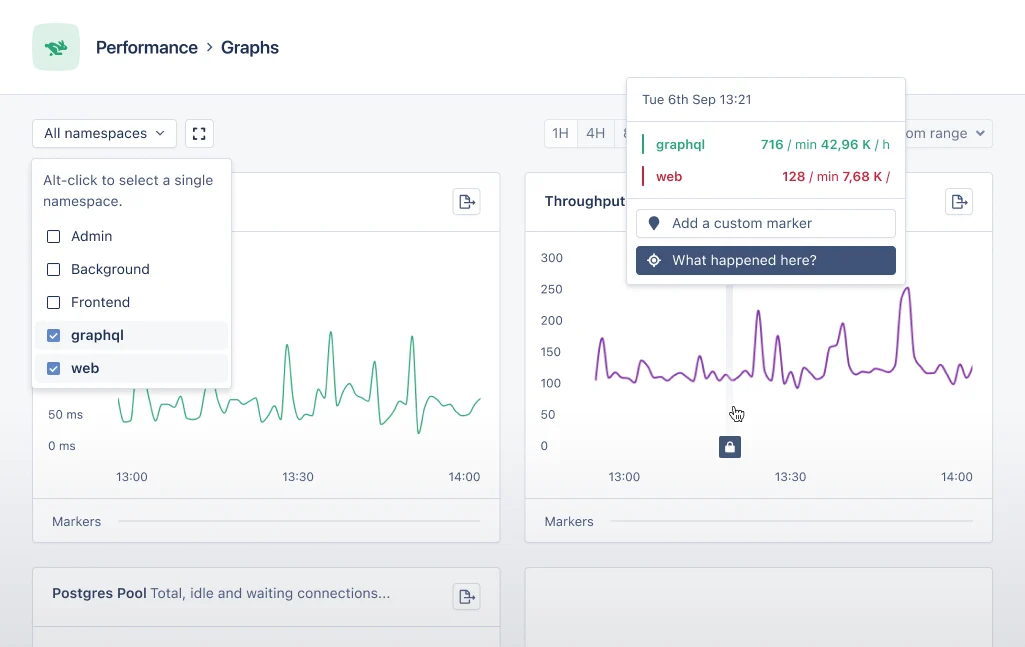
Namespaces are a way to group error incidents, performance incidents and metrics from actions. AppSignal uses three [namespaces] by default:
* `web` for web requests
* `frontend` for Front-end JavaScript
* `background` for background jobs
Applications can have any number of namespaces, for example, you could have a separate namespace for your application's administration panel, API or scheduled tasks. This guide will go through the steps needed to report actions in custom namespaces.
Want to know more about what namespaces can be used for? Check out this list:
[What Can You Do With
Namespaces?](/application/namespaces#what-can-you-do-with-namespaces)
 ## Configuring Namespaces
Namespaces are defined by your application's code. With small helpers, you can customize the namespace of an action. This guide will teach you how to split requests up into different namespaces. For this guide, we'll create an "admin" and a "critical" namespace for background jobs.
Namespace names may only contain letters (a-z) and underscores
## Configuring Namespaces
Namespaces are defined by your application's code. With small helpers, you can customize the namespace of an action. This guide will teach you how to split requests up into different namespaces. For this guide, we'll create an "admin" and a "critical" namespace for background jobs.
Namespace names may only contain letters (a-z) and underscores
We do not recommend having more than **15** namespaces per application.
#### Configurations per Language
* [Ruby](#ruby)
* [Elixir](#elixir)
* [Node.js](#nodejs)
* [Python](#python)
* [Front-end JavaScript](#front-end-javascript)
* [Go](#go)
* [Java](#java)
* [PHP](#php)
### Ruby
In Rails we can use the `before_action` callback to call a method before a request is handled. In the code example below, we've created a `before_action` that calls the `set_appsignal_namespace` method. In this method we call the [`Appsignal.set_namespace` helper method][ruby helper] to configure "admin" as the namespace for this request. This also works if other controllers are subclasses of the `AdminController`.
```ruby Ruby theme={null}
# In a Rails controller
# app/controllers/admin_controller.rb
class AdminController < ApplicationController
before_action :set_appsignal_namespace
def set_appsignal_namespace
# Configures all actions in this controller to report
# in the "admin" namespace
Appsignal.set_namespace("admin")
end
# Any other controller actions
end
```
Next we'll define the namespace of code executed by our application's Sidekiq background workers. To correctly namespace errors triggered in our background worker, we must define the namespace before any other code runs. In the example Sidekiq worker code below, we do this immediately in the perform method on line 7.
```ruby Ruby theme={null}
# In a Sidekiq worker
# app/workers/critical_worker.rb
class CriticalWorker
include Sidekiq::Worker
def perform
# Configures this worker's jobs to report in the "critical" namespace
Appsignal.set_namespace("critical")
# The actual worker code
end
end
```
It's also possible to configure the namespace when creating a transaction using the [`Appsignal.monitor`](https://rubydoc.info/gems/appsignal/Appsignal/Helpers/Instrumentation#monitor-instance_method) helper. It accepts the namespace as a keyword argument.
```ruby Ruby theme={null}
# When creating a new transaction
Appsignal.monitor(namespace: "admin") do
# Your code to instrument
end
```
For transactions that have already been created, you can use the `set_namespace` method to configure the transaction's namespace, like in the example below:
```ruby Ruby theme={null}
# When changing the namespace later on for a transaction
transaction.set_namespace("slow_admin")
```
##### A note on helper location
The `set_namespace` helpers used in this guide can be called in any action that is part of an AppSignal sample. We recommend calling this as early in the request or background job as possible, so the transaction is configured with the given namespace before any error occurs. Otherwise, if an error occurs, or anything else that stops the process, the transaction is sent to AppSignal before the `set_namespace` helper is called, and the sample is reported under the default namespace instead.
#### Read More
* [`Appsignal.set_namespace` helper method documentation][ruby helper]
### Elixir
In Phoenix controllers we use a `plug` to call a function before the request is handled by Phoenix. In the code example below we use `plug` to call the `set_appsignal_namespace` function (line 5). In this function we call the [`Appsignal.Span.set_namespace` helper][elixir helper] to configure the namespace for this request (line 10).
```elixir Elixir theme={null}
# In a Phoenix controller
defmodule AppsignalPhoenixExampleWeb.AdminController do
use AppsignalPhoenixExampleWeb, :controller
plug :set_appsignal_namespace
defp set_appsignal_namespace(conn, _params) do
# Configures all actions in this controller to report
# in the "admin" namespace
Appsignal.Span.set_namespace(Appsignal.Tracer.root_span(), "admin")
conn
end
# ...
end
```
Next we'll configure the namespace for a background job. To catch any errors from within the job within the desired namespace, `Appsignal.Span.set_namespace` must be called at the beginning of the function before any other code, like on line 4 of the below code example:
```elixir Elixir theme={null}
defmodule MyApp.CriticalJob do
def run do
# Configures this worker's jobs to report in the "critical" namespace
Appsignal.Span.set_namespace(Appsignal.Tracer.root_span(), "critical")
# The actual worker code
end
end
```
It's also possible to configure the namespace when creating a transaction. Please see the documentation for [decorators][elixir namespace_decorator] or [instrumentation helpers][elixir namespace_helper] for more information on how to configure namespaces.
#### A note on helper location
The `set_namespace` helpers used in this guide can be called in any action that starts an AppSignal transaction. We recommend calling this as early in the request or background job as possible, so the transaction is configured with the given namespace before any error occurs. Otherwise, if an error occurs—or anything else that stops the process—the transaction is sent to AppSignal before the `set_namespace` code is called and it is reported under the default namespace instead.
#### Read More
* [`Appsignal.Span.set_namespace` Helper Method Documentation][elixir helper]
* [Elixir Namespace Decorator][elixir namespace_decorator]
* [Elixir Namespace Instrumentation Helper][elixir namespace_helper]
### Node.js
In Node.js applications, AppSignal works with OpenTelemetry, which uses spans to track metadata, such as which namespace a span belongs to. Use the `setNamespace` helper function as sampled below to set the namespace for the active span's trace.
```javascript Node.js theme={null}
import { setNamespace } from "@appsignal/nodejs";
setNamespace("custom-namespace");
```
[Read more about how spans work in Node.js](/nodejs/3.x/instrumentation/instrumentation).
### PHP
In PHP applications, AppSignal works with OpenTelemetry, which uses spans to track metadata, such as which namespace a span belongs to. Use the `Appsignal::setNamespace` helper method to set the namespace for the active span's trace.
```php PHP theme={null}
Appsignal::setNamespace("admin");
```
If you call this helper multiple times within a single trace, AppSignal uses the call whose span has the newest timestamp.
[Read more about how custom instrumentation works in PHP][php custom instrumentation].
[php custom instrumentation]: /php/instrumentation.html
### Python
In Python applications, AppSignal works with OpenTelemetry, which uses spans to track metadata, such as which namespace a span belongs to. Use the `set_namespace` helper function as sampled below to set the namespace for the active span's trace.
```python Python theme={null}
from appsignal import set_namespace
set_namespace("custom-namespace")
```
[Read more about how spans work in Python](/python/instrumentation/instrumentation).
### Front-end JavaScript
In Front-end JavaScript applications AppSignal works with spans to track metadata such as a span's namespace.
Unlike Ruby, Node.js, PHP, and Python, the Front-end JavaScript API does not
have a global `setNamespace` / `set_namespace` helper. Instead, like Elixir,
Go, and Java, you set the namespace directly on a span.
When creating this span, call `setNamespace` with a `String` value of the desired namespace name, as demonstrated in the below example:
```javascript JavaScript theme={null}
const span = appsignal.createSpan();
span.setNamespace("admin"); // a custom namespace for this span (defaults to `frontend`)
```
[Read more about how spans work in Front-End JavaScript](/front-end/span).
### Go
In Go applications, AppSignal works with OpenTelemetry, which uses spans to track metadata, such as which namespace a span belongs to. On any span in the trace, set a `appsignal.namespace` attribute with a String value of the new namespace.
```go Go theme={null}
span.SetAttributes(attribute.String("appsignal.namespace", "admin"))
```
Please see the [Go custom instrumentation docs][go custom instrumentation] on how to fetch a span or create a new one.
If multiple attributes with the `appsignal.namespace` attribute are found, the span with the newest timestamp is leading.
[Read more about how custom instrumentation works in Go][go custom instrumentation].
[go custom instrumentation]: /go/custom-instrumentation.html
### Java
In Java applications, AppSignal works with OpenTelemetry, which uses spans to track metadata, such as which namespace a span belongs to. On any span in the trace, set a `appsignal.namespace` attribute with a String value of the new namespace.
```java Java theme={null}
span.setAttribute("appsignal.namespace", "admin");
```
Please see the [Java custom instrumentation docs][java custom instrumentation] on how to fetch a span or create a new one.
If multiple attributes with the `appsignal.namespace` attribute are found, the span with the newest timestamp is leading.
[Read more about how custom instrumentation works in Java][java custom instrumentation].
[java custom instrumentation]: /java/custom-instrumentation.html
## Deploy
When your application is configured with its new namespace helpers, commit your changes and deploy the app. When the app starts/restarts, AppSignal will report actions under their new namespace 🥳!
Data from old deploys will remain grouped by their original namespace. Only
newly reported actions will be grouped by their new namespaces.
Are namespaces not being reported correctly? Don't panic, [give us a shout][contact] and we will help you out!
## Further Reading
* [Filtering App Data][filtering]
* [Namespaces][namespaces]
* [Ignoring Namespaces][ignoring namespaces]
[contact]: mailto:support@appsignal.com
[elixir helper]: https://hexdocs.pm/appsignal/Appsignal.Span.html?#set_namespace/2
[elixir namespace_decorator]: /elixir/instrumentation/instrumentation.html#decorator-namespaces
[elixir namespace_helper]: /elixir/instrumentation/instrumentation.html#helper-namespaces
[filtering]: /guides/filter-data/
[ignoring namespaces]: /guides/filter-data/ignore-namespaces.html
[namespaces]: /application/namespaces.html
[ruby helper]: https://gemdocs.org/gems/appsignal/3.4.0/Appsignal/Transaction.html#initialize-instance_method
[tagging]: /guides/tagging.html