> ## Documentation Index
> Fetch the complete documentation index at: https://docs.appsignal.com/llms.txt
> Use this file to discover all available pages before exploring further.

# Add Custom Data

export const Compatibility = ({versions = [], label = "Available in"}) => {
  if (!Array.isArray(versions) || versions.length === 0) {
    return null;
  }
  const defaultPillStyle = {
    borderColor: "#d4d4d8",
    background: "#f4f4f5",
    color: "#3f3f46"
  };
  const pillStyles = {
    "AppSignal for Elixir": {
      background: "#f3e8ff",
      borderColor: "#d8b4fe",
      color: "#6b21a8"
    },
    "AppSignal for Front-end": {
      background: "#fef9c3",
      borderColor: "#fde047",
      color: "#854d0e"
    },
    "AppSignal for Go": {
      background: "#ccfbf1",
      borderColor: "#5eead4",
      color: "#115e59"
    },
    "AppSignal for JavaScript": {
      background: "#fef9c3",
      borderColor: "#fde047",
      color: "#854d0e"
    },
    "AppSignal for Node.js": {
      background: "#dcfce7",
      borderColor: "#86efac",
      color: "#166534"
    },
    "AppSignal for Python": {
      background: "#dbeafe",
      borderColor: "#93c5fd",
      color: "#1e40af"
    },
    "AppSignal for Ruby": {
      background: "#fee2e2",
      borderColor: "#fca5a5",
      color: "#991b1b"
    },
    "AppSignal for Rust": {
      background: "#ffedd5",
      borderColor: "#fdba74",
      color: "#9a3412"
    }
  };
  const getPillStyle = name => ({
    ...defaultPillStyle,
    ...pillStyles[name] || ({})
  });
  return <div className="not-prose my-4 rounded-lg border border-zinc-200 bg-zinc-50 px-4 py-3 text-sm dark:border-white/10 dark:bg-white/5">
      <div className="flex flex-wrap items-center gap-x-2 gap-y-1">
        <span className="font-semibold text-zinc-700 dark:text-zinc-200">
          {label}:
        </span>
        {versions.map((v, i) => <span key={`${v.name}-${v.version}-${i}`} className="inline-flex items-center gap-1 rounded-full border px-2 py-0.5 text-xs font-medium" style={getPillStyle(v.name)}>
            <span>{v.name}</span>
            <span className="opacity-70">
              {v.version}
              {v.exact ? "" : "+"}
            </span>
          </span>)}
      </div>
    </div>;
};

<Compatibility
  versions={[
{ name: "AppSignal for Ruby", version: "4.0.0" },
{ name: "AppSignal for Elixir", version: "1.0.0" },
{ name: "AppSignal for Node.js", version: "3.0.0" },
{ name: "AppSignal for Python", version: "0.3.0" },
{ name: "AppSignal for PHP", version: "0.5.0" },
]}
/>

You can use custom sample data to set more dynamic values than is possible with [other types of data customization](/guides/custom-data).

<Warning>
  🔐 Do not send <strong>Personal Identifiable Information (PII)</strong> to AppSignal. Filter PII (e.g., names, emails) and use an ID, hash, or pseudonymized identifier instead. <br /> <br /> Use [Link Templates](https://docs.appsignal.com/application/link-templates) to link them back in your app.
</Warning>

See the table below for a list of accepted root values per language. Each nested object can contain values that result in valid JSON (strings, integers, floats, booleans, nulls, etc.).

| Language   | Accepted root values |
| ---------- | -------------------- |
| Ruby       | Arrays, Hashes       |
| JavaScript | Arrays, Objects      |
| Elixir     | Lists, Maps          |
| Python     | Lists, Maps          |
| PHP        | Arrays, Objects      |

It is not possible to filter or search on the data set as custom data. It only provides an additional area in the interface to list more metadata.

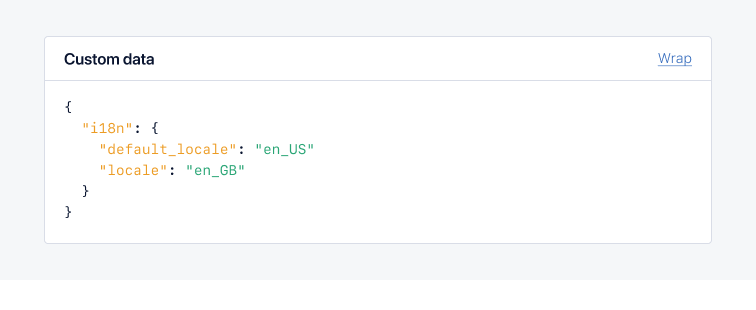
When using custom data for nested objects, you can view the object on the Incident Sample page for both Exception and Performance samples formatted as JSON, like in the example below:

<CodeGroup>
  ```ruby Ruby theme={null}
  # Call `add_custom_data` multiple times to add more custom data
  # Hash example
  Appsignal.add_custom_data(
    :stroopwaffle => { :caramel => true },
    :market => { :type => "outdoors" }
  )
  Appsignal.add_custom_data(:market => { :state => :closed })
  Appsignal.add_custom_data(:market => { :state => :open })
  # Custom data:
  # {
  #   :stroopwaffle => { :caramel => true },
  #   :market => { :state => :open }
  # }

  # Array example
  Appsignal.add_custom_data(["value 1"])
  Appsignal.add_custom_data(["value 2"])
  # Custom data: ["value 1", "value 2"]

  # Mixed data type example
  # The Hash and Array data type cannot be mixed at the root level
  Appsignal.add_custom_data(:market => :open)
  Appsignal.add_custom_data(["value 1"])
  # Custom data: ["value 1"]
  ```

  ```elixir Elixir theme={null}
  # Map
  Appsignal.Span.set_sample_data(
    Appsignal.Tracer.root_span,
    "custom_data",
    %{
      stroopwaffle: %{
        caramel: true,
        origin: "market"
      }
    }
  )

  # List
  Appsignal.Span.set_sample_data(
    Appsignal.Tracer.root_span,
    "custom_data",
    [
      "value 1",
      "value 2"
    ]
  )
  ```

  ```javascript Node.js theme={null}
  import { setCustomData } from "@appsignal/nodejs";

  // Object
  setCustomData({
    stroopwaffle: {
      caramel: true,
      origin: "market",
    },
  });

  // Array
  setCustomData(["value 1", "value 2"]);
  ```

  ```python Python theme={null}
  from appsignal import set_custom_data

  # Map
  set_custom_data({
    "stroopwaffle": {
      "caramel": true,
      "origin": "market"
    }
  })

  # Array
  set_custom_data(["value 1", "value 2"])
  ```

  ```php PHP theme={null}
  <?php
  use Appsignal\Appsignal;

  Appsignal::setCustomData([
      'stroopwaffle' => [
          'caramel' => true,
          'origin' => 'market',
      ],
  ]);
  ```
</CodeGroup>

If the application sets custom data multiple times, the Ruby gem will merge values at the root level. For other integrations, only the last set value is stored.
<img src="https://mintcdn.com/appsignal-715f5a51/MS9b5WO71lSfD5jG/assets/images/screenshots/sample_data/custom-data.png?fit=max&auto=format&n=MS9b5WO71lSfD5jG&q=85&s=0219d24992c0f08a2cd65e2ced181c1e" alt="custom_data" width="756" height="310" data-path="assets/images/screenshots/sample_data/custom-data.png" />
