> ## Documentation Index
> Fetch the complete documentation index at: https://docs.appsignal.com/llms.txt
> Use this file to discover all available pages before exploring further.

# Oban

export const VersionRequirements = ({versions = []}) => {
  if (!Array.isArray(versions) || versions.length === 0) {
    return null;
  }
  const boundaries = {
    upper: " or lower",
    exact: "",
    lower: " or higher"
  };
  const containerStyle = {
    marginTop: "0.5rem",
    marginBottom: "1.5rem"
  };
  const lineStyle = {
    display: "block",
    margin: "0 0 0.35rem 0",
    fontSize: "0.875rem",
    lineHeight: "1.4"
  };
  const pillBaseStyle = {
    display: "inline-block",
    padding: "0.1em 0.4em",
    borderRadius: "0.25rem",
    border: "1px solid",
    fontFamily: "ui-monospace, SFMono-Regular, Menlo, monospace",
    fontSize: "0.85em",
    fontWeight: 500
  };
  const pillColors = {
    "AppSignal for Elixir": {
      background: "#f3e8ff",
      borderColor: "#e9d5ff",
      color: "#9333ea"
    },
    "AppSignal for Front-end": {
      background: "#fef9c3",
      borderColor: "#fde68a",
      color: "#ca8a04"
    },
    "AppSignal for Go": {
      background: "#ccfbf1",
      borderColor: "#99f6e4",
      color: "#0d9488"
    },
    "AppSignal for JavaScript": {
      background: "#fef9c3",
      borderColor: "#fde68a",
      color: "#ca8a04"
    },
    "AppSignal for Node.js": {
      background: "#dcfce7",
      borderColor: "#bbf7d0",
      color: "#16a34a"
    },
    "AppSignal for Python": {
      background: "#dbeafe",
      borderColor: "#bfdbfe",
      color: "#2563eb"
    },
    "AppSignal for Ruby": {
      background: "#fee2e2",
      borderColor: "#fecaca",
      color: "#dc2626"
    },
    "AppSignal for Rust": {
      background: "#ffedd5",
      borderColor: "#fed7aa",
      color: "#ea580c"
    }
  };
  const defaultPillColor = {
    background: "#f4f4f5",
    borderColor: "#e4e4e7",
    color: "#52525b"
  };
  const getPillStyle = name => ({
    ...pillBaseStyle,
    ...pillColors[name] || defaultPillColor
  });
  const getBoundText = bound => {
    return boundaries[bound] || boundaries.lower;
  };
  return <div style={containerStyle}>
      {versions.map((v, i) => <p key={`${v.name}-${v.version}-${v.bound || "lower"}-${i}`} style={lineStyle}>
          This feature requires{" "}
          <code style={getPillStyle(v.name)}>{v.name}</code> version {v.version}
          {getBoundText(v.bound)}.
        </p>)}
    </div>;
};

<VersionRequirements
  versions={[
{ name: "AppSignal for Elixir", version: "2.5.0" },
{ name: "Oban", version: "2.0" }
]}
/>

The AppSignal for Elixir package instruments jobs performed by [Oban](https://oban.pro) workers, and collects metrics about your jobs' performance.

Oban is a job queueing and processing system for Elixir, based on PostgreSQL and Ecto. You can use Oban to schedule jobs to be ran in the background.

## Automatic Instrumentation

Oban support is automatically instrumented, requiring no configuration.

To disable the Oban instrumentation, set [the `instrument_oban` config option](/elixir/configuration/options#option-instrument_oban) to `false`.

<Note>
  🔎 The `instrument_oban` config option was added in version `2.5.1` of the
  AppSignal for Elixir integration.
</Note>

## Error Reporting

By default, the Oban instrumentation will create an error sample whenever one of your workers fails to process a job, either by returning an `{:error, _}` tuple or by throwing an exception.

If you only wish to send errors to AppSignal when the failure causes the job to be discarded, that is, once it's reached its maximum retry attempts, set [the `report_oban_errors` config option](/elixir/configuration/options#option-report_oban_errors) to `"discard"`. Set it to `"none"` to never send Oban job errors to AppSignal.

<Tip>
  The `report_oban_errors` config option was added in version `2.5.1` of the
  AppSignal for Elixir integration.

  If using Oban version `2.3.1` or below, the information about the state of
  the job is not available, and the `"discard"` option will behave like
  `"all"`.
</Tip>

## Performance and Error Samples

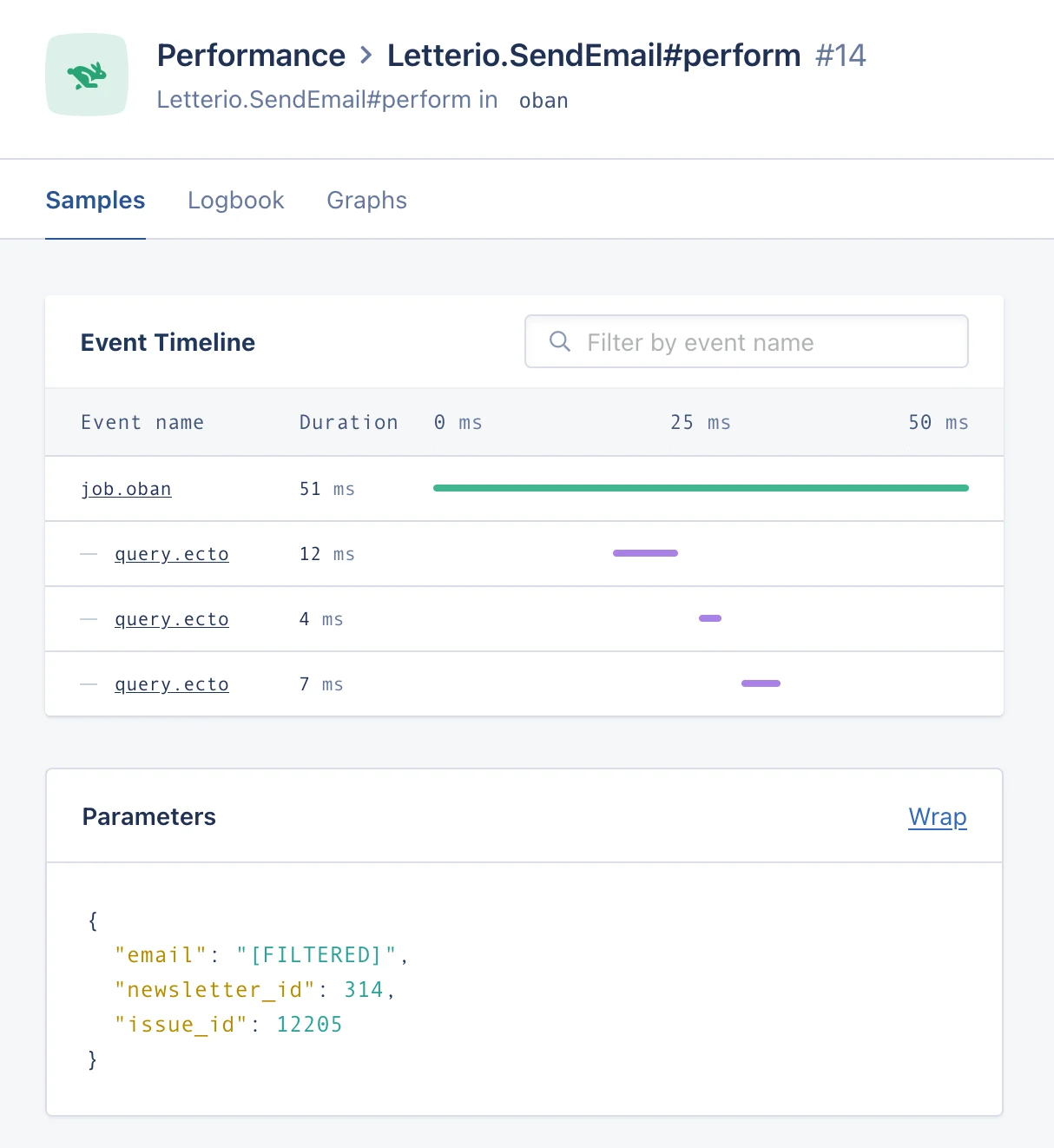
AppSignal will create performance samples out of jobs executed by your Oban workers:

<img src="https://mintcdn.com/appsignal-715f5a51/nF8c1Rwq1cS7b5hg/assets/images/screenshots/elixir/integrations/oban/performance-sample.png?fit=max&auto=format&n=nF8c1Rwq1cS7b5hg&q=85&s=621798315f06965a7add76e3394e2951" alt="Performance sample from an Oban job execution" width="1214" height="1322" data-path="assets/images/screenshots/elixir/integrations/oban/performance-sample.png" />

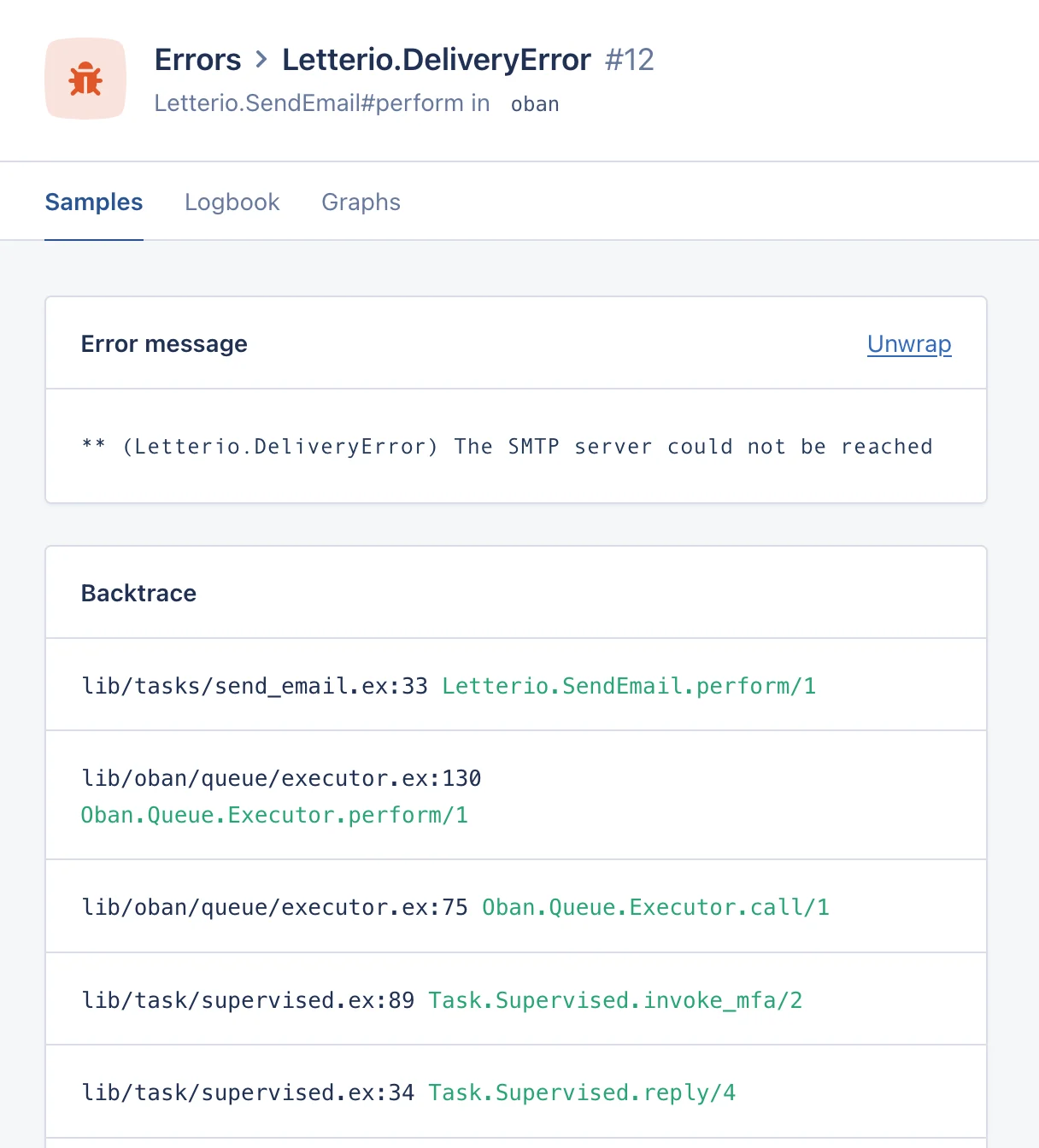
It will also notify errors that cause your workers to fail while processing a job:
<img src="https://mintcdn.com/appsignal-715f5a51/nF8c1Rwq1cS7b5hg/assets/images/screenshots/elixir/integrations/oban/error-sample.png?fit=max&auto=format&n=nF8c1Rwq1cS7b5hg&q=85&s=5f3981d36741d877d13392bb7ece39ed" alt="Error sample from an Oban job execution" width="1216" height="1344" data-path="assets/images/screenshots/elixir/integrations/oban/error-sample.png" />

Within the performance and error samples, the tags will contain information about the job:

* Job ID, queue, worker and priority
* Number of previous attempts
* Job state and result after execution

Any tags or metadata values added to the job will also be present as tags in the sample, allowing you to filter the samples for a specific tag.

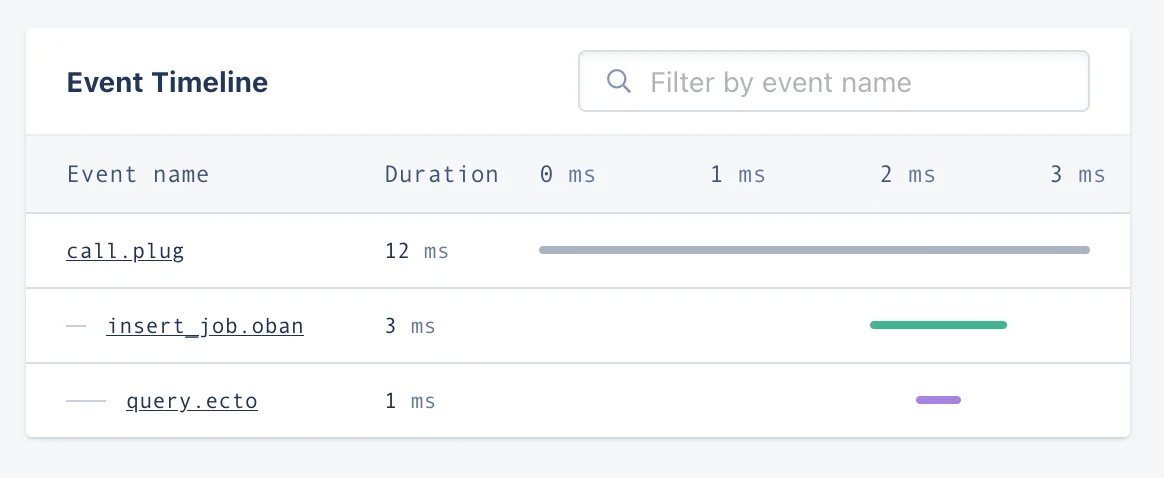
You will also be able to see when an Oban job is inserted in the event timeline of your application's performance samples:
<img src="https://mintcdn.com/appsignal-715f5a51/nF8c1Rwq1cS7b5hg/assets/images/screenshots/elixir/integrations/oban/event-timeline.png?fit=max&auto=format&n=nF8c1Rwq1cS7b5hg&q=85&s=4ba7ea26be30b29287edeef6b0e53545" alt="Event timeline showing an Oban job insertion" width="1164" height="478" data-path="assets/images/screenshots/elixir/integrations/oban/event-timeline.png" />

<Note>
  🔎 Some features are only available in certain Oban versions:

  * **2.1.0+:** Tags
  * **2.3.1+:** Metadata values and job priority
  * **2.4.0+:** Job state after execution
  * **2.5.0+:** Job result after execution
  * **2.11.0+:** Job insertion event

  To make use of all the features described above, upgrade to the latest Oban version.
</Note>

## Metrics

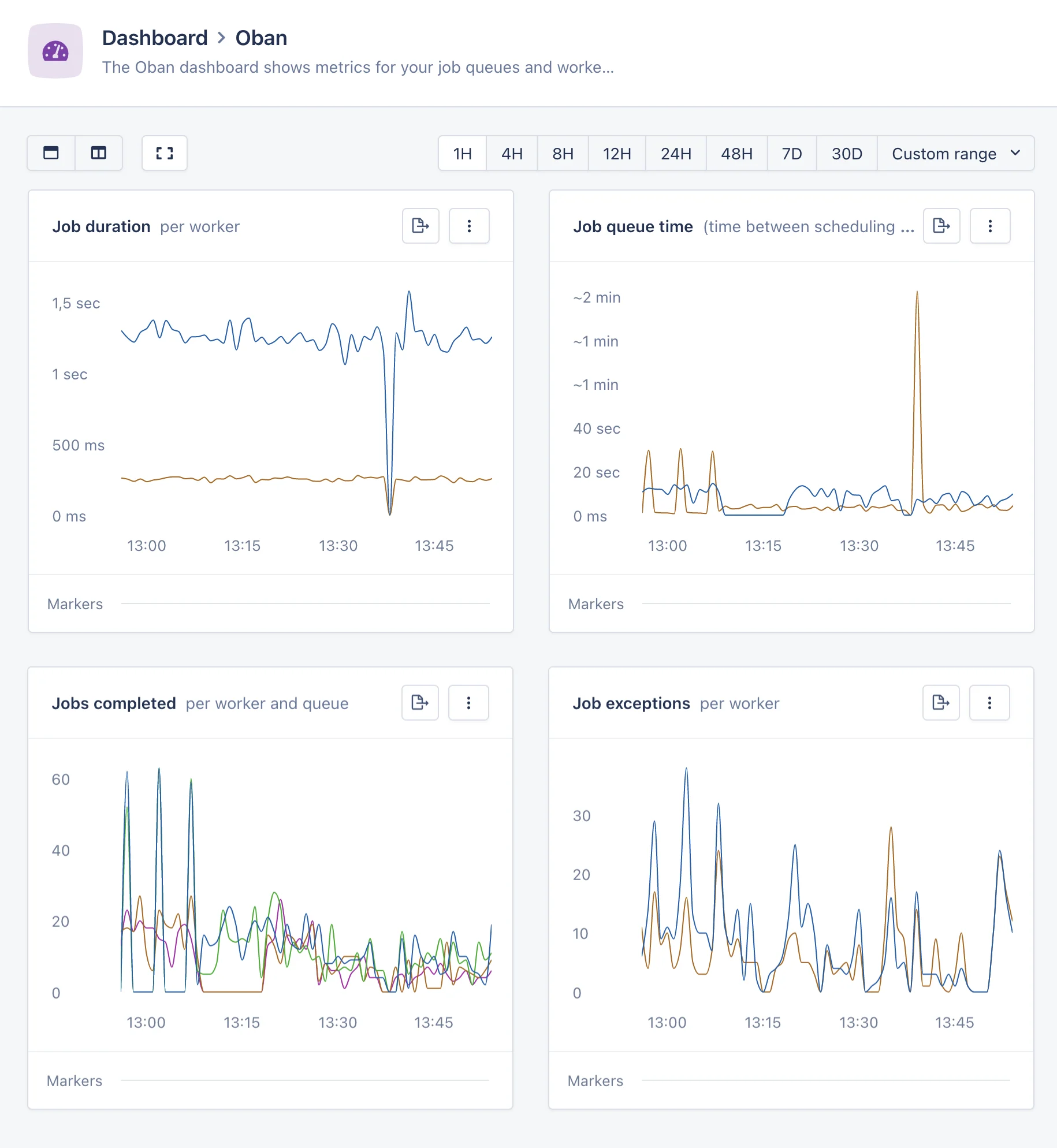
In addition to the performance and error samples, AppSignal for Elixir will collect metrics about the performance of your Oban jobs:

* `oban_job_duration`: the duration of the jobs processed, tagged by the job's worker, queue and status.

* `oban_job_queue_time`: the time spent by jobs waiting in the queue, tagged by queue.

* `oban_job_count`: the amount of jobs processed, tagged by the job's worker, queue and status.

Using this metrics, AppSignal will automatically create the Oban magic dashboard, which provides key insights into your Oban system's performance:

<img src="https://mintcdn.com/appsignal-715f5a51/nF8c1Rwq1cS7b5hg/assets/images/screenshots/elixir/integrations/oban/magic-dashboard.png?fit=max&auto=format&n=nF8c1Rwq1cS7b5hg&q=85&s=9772c0b582e542ca48ef609f26b96037" alt="Magic dashboard showing key Oban metrics" width="1830" height="1988" data-path="assets/images/screenshots/elixir/integrations/oban/magic-dashboard.png" />
