> ## Documentation Index
> Fetch the complete documentation index at: https://docs.appsignal.com/llms.txt
> Use this file to discover all available pages before exploring further.

# Finch

export const VersionRequirements = ({versions = []}) => {
  if (!Array.isArray(versions) || versions.length === 0) {
    return null;
  }
  const boundaries = {
    upper: " or lower",
    exact: "",
    lower: " or higher"
  };
  const containerStyle = {
    marginTop: "0.5rem",
    marginBottom: "1.5rem"
  };
  const lineStyle = {
    display: "block",
    margin: "0 0 0.35rem 0",
    fontSize: "0.875rem",
    lineHeight: "1.4"
  };
  const pillBaseStyle = {
    display: "inline-block",
    padding: "0.1em 0.4em",
    borderRadius: "0.25rem",
    border: "1px solid",
    fontFamily: "ui-monospace, SFMono-Regular, Menlo, monospace",
    fontSize: "0.85em",
    fontWeight: 500
  };
  const pillColors = {
    "AppSignal for Elixir": {
      background: "#f3e8ff",
      borderColor: "#e9d5ff",
      color: "#9333ea"
    },
    "AppSignal for Front-end": {
      background: "#fef9c3",
      borderColor: "#fde68a",
      color: "#ca8a04"
    },
    "AppSignal for Go": {
      background: "#ccfbf1",
      borderColor: "#99f6e4",
      color: "#0d9488"
    },
    "AppSignal for JavaScript": {
      background: "#fef9c3",
      borderColor: "#fde68a",
      color: "#ca8a04"
    },
    "AppSignal for Node.js": {
      background: "#dcfce7",
      borderColor: "#bbf7d0",
      color: "#16a34a"
    },
    "AppSignal for Python": {
      background: "#dbeafe",
      borderColor: "#bfdbfe",
      color: "#2563eb"
    },
    "AppSignal for Ruby": {
      background: "#fee2e2",
      borderColor: "#fecaca",
      color: "#dc2626"
    },
    "AppSignal for Rust": {
      background: "#ffedd5",
      borderColor: "#fed7aa",
      color: "#ea580c"
    }
  };
  const defaultPillColor = {
    background: "#f4f4f5",
    borderColor: "#e4e4e7",
    color: "#52525b"
  };
  const getPillStyle = name => ({
    ...pillBaseStyle,
    ...pillColors[name] || defaultPillColor
  });
  const getBoundText = bound => {
    return boundaries[bound] || boundaries.lower;
  };
  return <div style={containerStyle}>
      {versions.map((v, i) => <p key={`${v.name}-${v.version}-${v.bound || "lower"}-${i}`} style={lineStyle}>
          This feature requires{" "}
          <code style={getPillStyle(v.name)}>{v.name}</code> version {v.version}
          {getBoundText(v.bound)}.
        </p>)}
    </div>;
};

<VersionRequirements
  versions={[
{ name: "AppSignal for Elixir", version: "2.3.0" },
{ name: "Finch", version: "0.12.0" }
]}
/>

The AppSignal for Elixir package instruments HTTP requests performed by [Finch](https://github.com/sneako/finch).

Finch is a performance-focused HTTP client built on top of [Mint](https://blog.appsignal.com/2022/10/20/appsignal-for-elixir-now-supports-finch.html#:~:text=on%20top%20of-,Mint,-%2C%20Elixir%27s%20low%2Dlevel), Elixir's low-level HTTP client library, and has built-in support for request telemetry. Finch handles the opening and closing of connections, making it easier for you to add HTTP requests to your application.

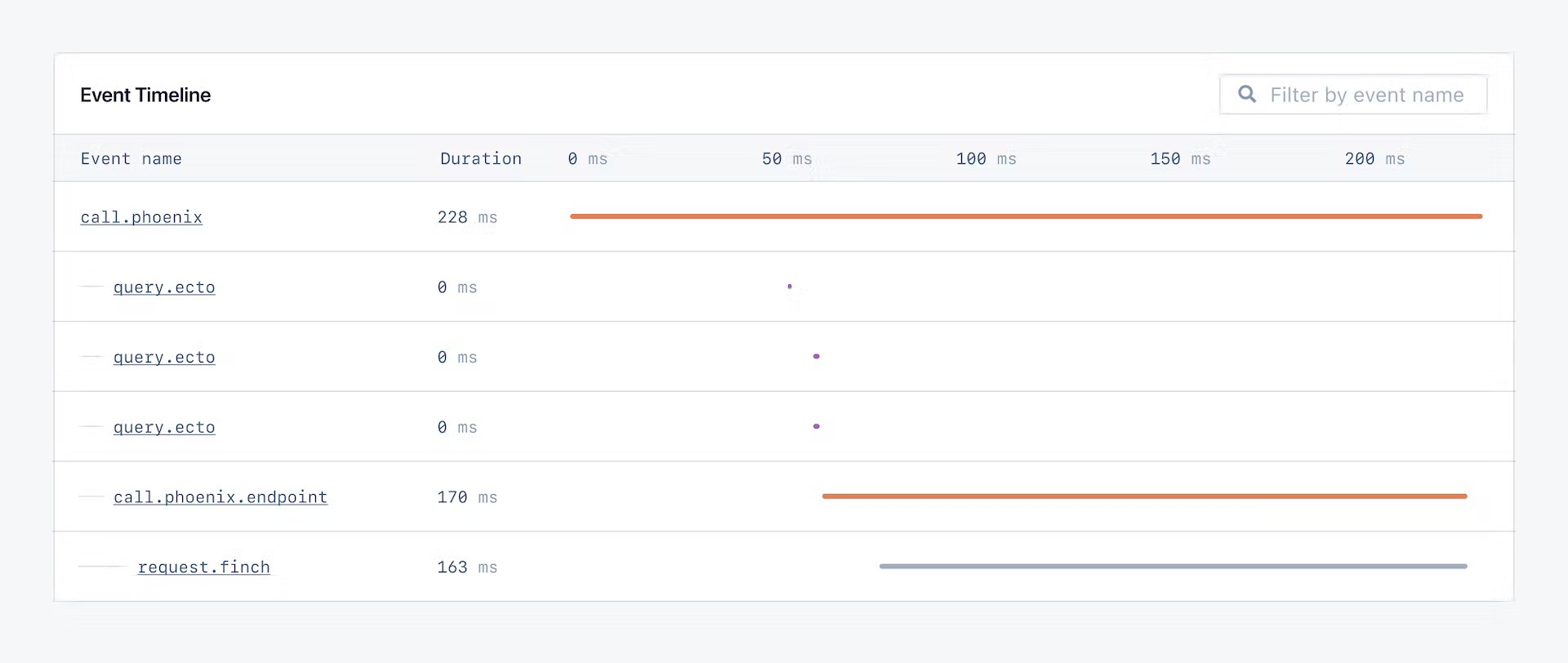
AppSignal will automatically recognize external requests executed by Finch and wrap them into a `request.finch` event on your Event Timeline, like in the below example:

<img src="https://mintcdn.com/appsignal-715f5a51/nF8c1Rwq1cS7b5hg/assets/images/screenshots/elixir/integrations/finch/event-timeline.png?fit=max&auto=format&n=nF8c1Rwq1cS7b5hg&q=85&s=75978cce3de54feb4dd9b805f6fcd5ef" alt="Event Timeline" width="1920" height="812" data-path="assets/images/screenshots/elixir/integrations/finch/event-timeline.png" />

In the Event Timeline, you'll see how much time Finch spends making external API requests. This data may help inform you to move the API requests to a background job or introduce caching to help speed up performance and limit unnecessary API requests.

## Automatic Instrumentation

<Tip>
  The `instrument_finch` config option was added in version `2.5.1` of the
  AppSignal for Elixir integration.
</Tip>

Finch is automatically instrumented, requiring no configuration. To disable the Finch instrumentation, set [the `instrument_finch` config option](/elixir/configuration/options#option-instrument_finch) to `false`.
