> ## Documentation Index
> Fetch the complete documentation index at: https://docs.appsignal.com/llms.txt
> Use this file to discover all available pages before exploring further.

# Instrumenting Ecto queries

export const Compatibility = ({versions = [], label = "Available in"}) => {
  if (!Array.isArray(versions) || versions.length === 0) {
    return null;
  }
  const defaultPillStyle = {
    borderColor: "#d4d4d8",
    background: "#f4f4f5",
    color: "#3f3f46"
  };
  const pillStyles = {
    "AppSignal for Elixir": {
      background: "#f3e8ff",
      borderColor: "#d8b4fe",
      color: "#6b21a8"
    },
    "AppSignal for Front-end": {
      background: "#fef9c3",
      borderColor: "#fde047",
      color: "#854d0e"
    },
    "AppSignal for Go": {
      background: "#ccfbf1",
      borderColor: "#5eead4",
      color: "#115e59"
    },
    "AppSignal for JavaScript": {
      background: "#fef9c3",
      borderColor: "#fde047",
      color: "#854d0e"
    },
    "AppSignal for Node.js": {
      background: "#dcfce7",
      borderColor: "#86efac",
      color: "#166534"
    },
    "AppSignal for Python": {
      background: "#dbeafe",
      borderColor: "#93c5fd",
      color: "#1e40af"
    },
    "AppSignal for Ruby": {
      background: "#fee2e2",
      borderColor: "#fca5a5",
      color: "#991b1b"
    },
    "AppSignal for Rust": {
      background: "#ffedd5",
      borderColor: "#fdba74",
      color: "#9a3412"
    }
  };
  const getPillStyle = name => ({
    ...defaultPillStyle,
    ...pillStyles[name] || ({})
  });
  return <div className="not-prose my-4 rounded-lg border border-zinc-200 bg-zinc-50 px-4 py-3 text-sm dark:border-white/10 dark:bg-white/5">
      <div className="flex flex-wrap items-center gap-x-2 gap-y-1">
        <span className="font-semibold text-zinc-700 dark:text-zinc-200">
          {label}:
        </span>
        {versions.map((v, i) => <span key={`${v.name}-${v.version}-${i}`} className="inline-flex items-center gap-1 rounded-full border px-2 py-0.5 text-xs font-medium" style={getPillStyle(v.name)}>
            <span>{v.name}</span>
            <span className="opacity-70">
              {v.version}
              {v.exact ? "" : "+"}
            </span>
          </span>)}
      </div>
    </div>;
};

AppSignal uses Ecto’s Telemetry instrumentation to gain information about queries ran in your app by attaching a handler that gets called whenever a query is executed.

## Automatic instrumentation

The Ecto instrumentation automatically hooks into your Ecto repos if the `:otp_app` configuration is configured to your app's OTP app name. The installer automatically configures this for you.
<CodeGroup>
  ```elixir Elixir theme={null}
  config :appsignal, :config,
    otp_app: :my_app, # Set this to the name of your OTP app
    name: "My app",
    push_api_key: "your-api-key",
    env: Mix.env
  ```
</CodeGroup>

The integration then uses your app's configuration to find out which repos are configured, as your app will have a configuration line like this in `config/config.exs`:

<CodeGroup>
  ```elixir Elixir theme={null}
  config :my_app,
    ecto_repos: [AppsignalPhoenixExample.Repo]
  ```
</CodeGroup>

### Disable automatic instrumentation

<Compatibility versions={[{ name: "AppSignal for Elixir", version: "2.5.1" }]} />

To disable automatic Ecto instrumentation, set [the `instrument_ecto` config option](/elixir/configuration/options#option-instrument_ecto) to `false`.

## Instrumenting Ecto preloads

<Compatibility versions={[{ name: "AppSignal for Elixir", version: "2.8.2" }]} />

Since Ecto preload queries internally use several Elixir processes to carry out the different database queries involved, some manual changes to your codebase are necessary for AppSignal to properly instrument them.

At the top of your Ecto repo module, replace `use Ecto.Repo` with `use Appsignal.Ecto.Repo`, as in the following example:

<CodeGroup>
  ```elixir Elixir theme={null}
  defmodule MyApp.Repo do
    # replace `use Ecto.Repo` with `use Appsignal.Ecto.Repo`
    use Appsignal.Ecto.Repo,
      otp_app: :my_app,
      adapter: Ecto.Adapters.Postgres
  end
  ```
</CodeGroup>

If your Ecto repo module has its own implementation of the `default_options/1` function, make sure to call `super` within it to merge its default options with those of AppSignal's Ecto repo instrumentation:

<CodeGroup>
  ```elixir Elixir theme={null}
  defmodule MyApp.Repo do
    use Appsignal.Ecto.Repo, ...

    def default_options(operation) do
      super(operation) ++ [
        # ... your default options here ...
      ]
    end
  end
  ```
</CodeGroup>

## Manual handler attachment

For repos that aren't listed in the `:ecto_repos` configuration, you can attach a handler manually when starting your app’s supervisor. In most applications, this is done in your application’s `start/2` function.

<CodeGroup>
  ```elixir Elixir theme={null}
  def start(_type, _args) do
    children = [
      AppsignalPhoenixExample.Repo,
      AppsignalPhoenixExampleWeb.Endpoint
    ]

    Appsignal.Ecto.attach(:my_otp_app, MyApp.Repo)

    opts = [strategy: :one_for_one, name: AppsignalPhoenixExample.Supervisor]
    Supervisor.start_link(children, opts)
  end
  ```
</CodeGroup>

In this example, we’ve attached the Telemetry handler to our Phoenix application by calling `Appsignal.Ecto.attach/2`. The first argument is the name of the OTP app that the repo belongs to, and the second argument is the repo's module.

## Metrics

<Compatibility versions={[{ name: "AppSignal for Elixir", version: "2.17.2" }]} />

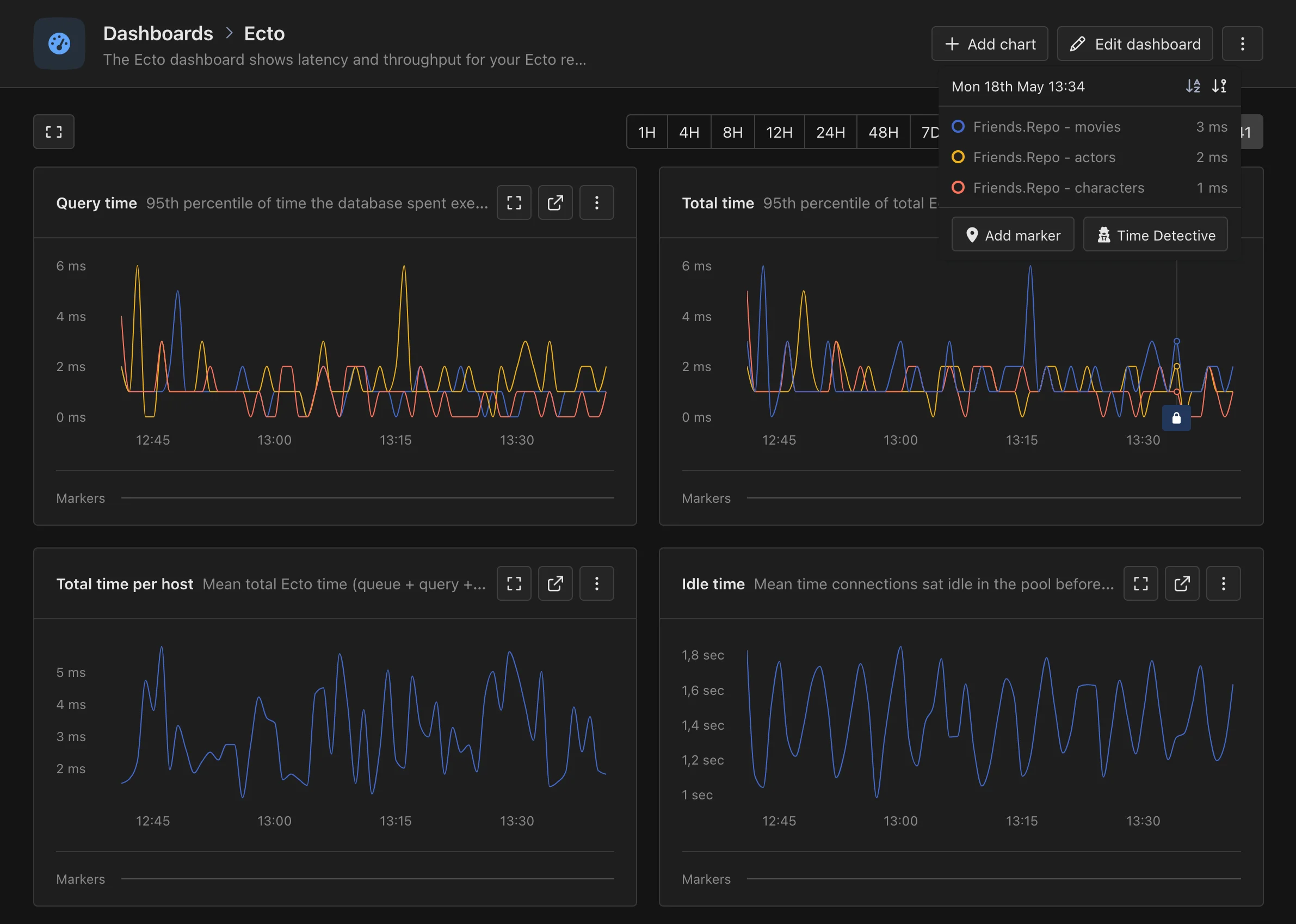
In addition to instrumenting your Ecto queries, AppSignal for Elixir collects
metrics about your Ecto repos' performance:

* `ecto_query_time`: The time the database spends executing each query, tagged
  by `repo` and `hostname`, and for each table by `repo` and `source`.

* `ecto_queue_time`: The time spent waiting for a database connection from the
  pool, tagged by `repo` and `hostname`.

* `ecto_decode_time`: The time spent decoding query results into Elixir terms,
  tagged by `repo` and `hostname`, and for each table by `repo` and `source`.

* `ecto_idle_time`: The time the connection sat idle in the pool before being
  checked out, tagged by `repo` and `hostname`.

* `ecto_total_time`: The sum of queue, query, and decode time, tagged by `repo`
  and `hostname`, and for each table by `repo` and `source`.

AppSignal uses these metrics to create the Ecto magic dashboard, which
shows key insights into your Ecto repos' performance:

<Frame caption="The Ecto magic dashboard in AppSignal">
  <img src="https://mintcdn.com/appsignal-715f5a51/nF8c1Rwq1cS7b5hg/assets/images/screenshots/elixir/integrations/ecto/automated-dashboard.png?fit=max&auto=format&n=nF8c1Rwq1cS7b5hg&q=85&s=a53723c44b296164b7ad992951faa48d" alt="Magic dashboard showing key Ecto metrics" width="2382" height="1698" data-path="assets/images/screenshots/elixir/integrations/ecto/automated-dashboard.png" />
</Frame>
