> ## Documentation Index
> Fetch the complete documentation index at: https://docs.appsignal.com/llms.txt
> Use this file to discover all available pages before exploring further.
# Process monitor occurrences
You'll be able to begin monitoring your process monitors in AppSignal after:
* [Creating a process monitor in AppSignal](/check-ins/create)
* [Configuring your application to send process monitors to AppSignal](/check-ins/configuration)
A process monitor consists of occurrences which can succeed or fail. For a cron process monitor, an occurrence is a time at which, according to its configured schedule, AppSignal expects to receive a start and finish event for this process monitor. A cron process monitor's occurrence succeeds if it receives a finish event during its maximum duration.
For a heartbeat process monitor, an occurrence is a time at which AppSignal has received a heartbeat event, and an occurrence succeeds if it receives another heartbeat event during its maximum duration.
## Viewing process monitors
To view all of your app's process monitors, click on the Process Monitoring overview via the AppSignal app navigation:
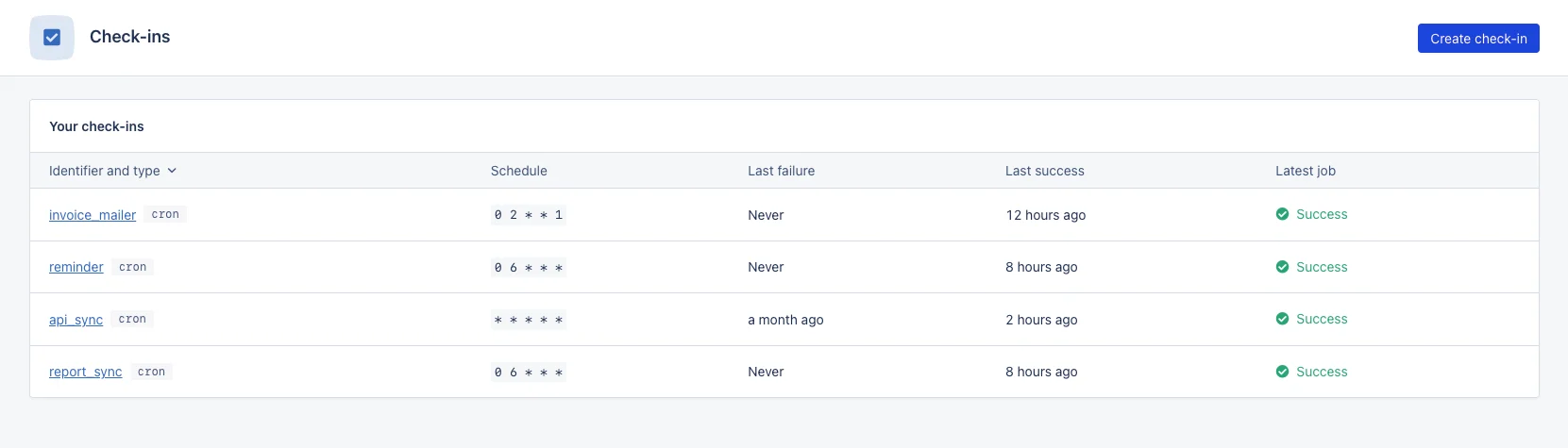 Here, you will have an overview of your process monitors with the following columns:
| Column name | Description |
| ------------------- | -------------------------------------------------------------------------------------------------------------------------------------------------------------- |
| Identifier and type | The identifier of your process monitor and its type. |
| Schedule | The schedule of your process monitor: the crontab syntax for cron process monitors, or the maximum duration between heartbeats for heartbeat process monitors. |
| Last failure | The last time a process monitor occurrence failed. |
| Last success | The last time a process monitor occurrence succeeded. |
| Last occurrence | The status of the last process monitor occurrence. |
## Statuses
The state of a process monitor will be that of its last occurrence. Process monitor occurrences will have one of the following statuses:
| Status | Description |
| --------------------------------------------------------------------------------- | -------------------------------------------------------------------------------------------------------------------- |
| New | No events have yet been received for this process monitor. |
| Success | The process monitor occurrence has been completed within its maximum duration. |
| Late | The process monitor occurrence has been completed *after* its maximum duration. |
| Missed | The process monitor occurrence has not been completed. |
| Running | A start cron process monitor event has been received, or a previous heartbeat's maximum duration has not yet passed. |
Late or missed process monitor occurrences are considered to have failed, and AppSignal will notify you that the process monitor has failed according to your process monitor's settings.
## Process monitor summary
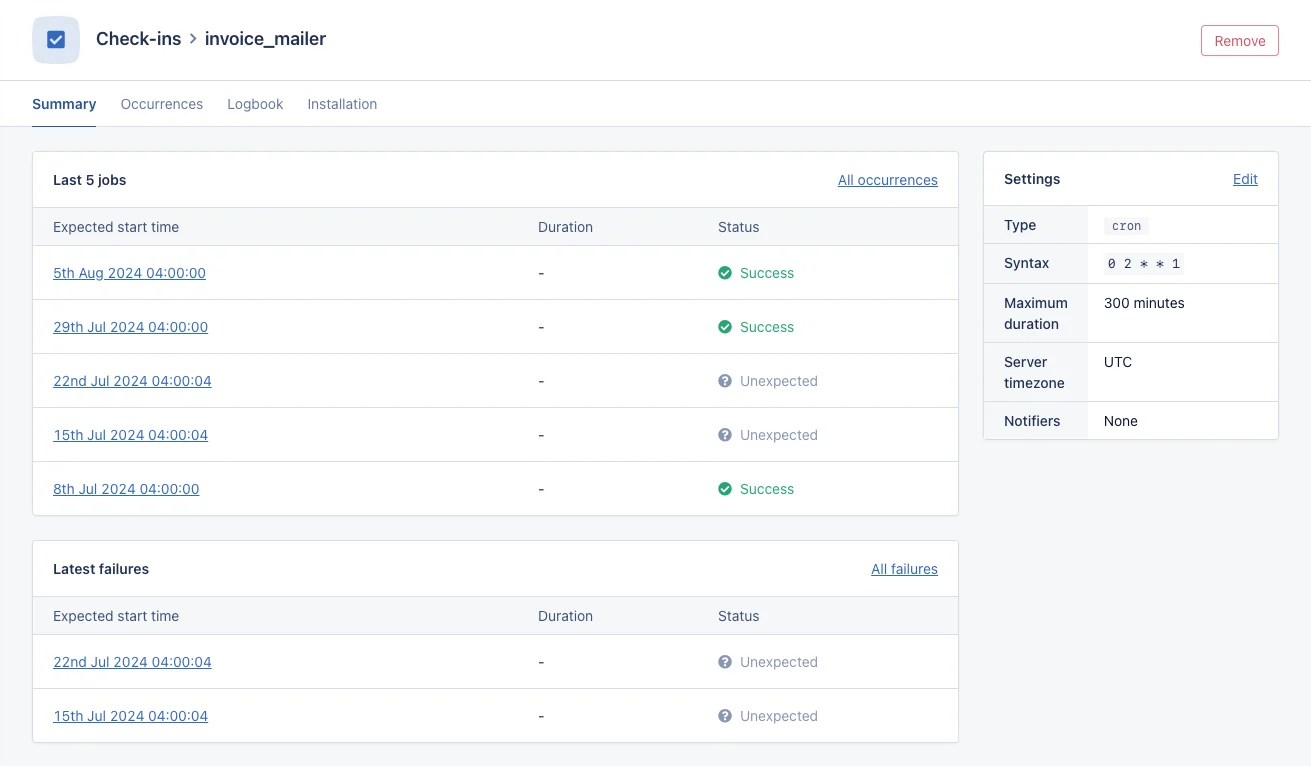
Clicking on the identifier of a process monitor will take you to an overview of:
* **The last five occurrences:** The timestamps for the last five occurrences for the process monitor alongside their status.
* **The last five failed occurrences:** The timestamps for the last five missed or late process monitor occurrences.
Here, you will have an overview of your process monitors with the following columns:
| Column name | Description |
| ------------------- | -------------------------------------------------------------------------------------------------------------------------------------------------------------- |
| Identifier and type | The identifier of your process monitor and its type. |
| Schedule | The schedule of your process monitor: the crontab syntax for cron process monitors, or the maximum duration between heartbeats for heartbeat process monitors. |
| Last failure | The last time a process monitor occurrence failed. |
| Last success | The last time a process monitor occurrence succeeded. |
| Last occurrence | The status of the last process monitor occurrence. |
## Statuses
The state of a process monitor will be that of its last occurrence. Process monitor occurrences will have one of the following statuses:
| Status | Description |
| --------------------------------------------------------------------------------- | -------------------------------------------------------------------------------------------------------------------- |
| New | No events have yet been received for this process monitor. |
| Success | The process monitor occurrence has been completed within its maximum duration. |
| Late | The process monitor occurrence has been completed *after* its maximum duration. |
| Missed | The process monitor occurrence has not been completed. |
| Running | A start cron process monitor event has been received, or a previous heartbeat's maximum duration has not yet passed. |
Late or missed process monitor occurrences are considered to have failed, and AppSignal will notify you that the process monitor has failed according to your process monitor's settings.
## Process monitor summary
Clicking on the identifier of a process monitor will take you to an overview of:
* **The last five occurrences:** The timestamps for the last five occurrences for the process monitor alongside their status.
* **The last five failed occurrences:** The timestamps for the last five missed or late process monitor occurrences.