> ## Documentation Index
> Fetch the complete documentation index at: https://docs.appsignal.com/llms.txt
> Use this file to discover all available pages before exploring further.
# Namespaces
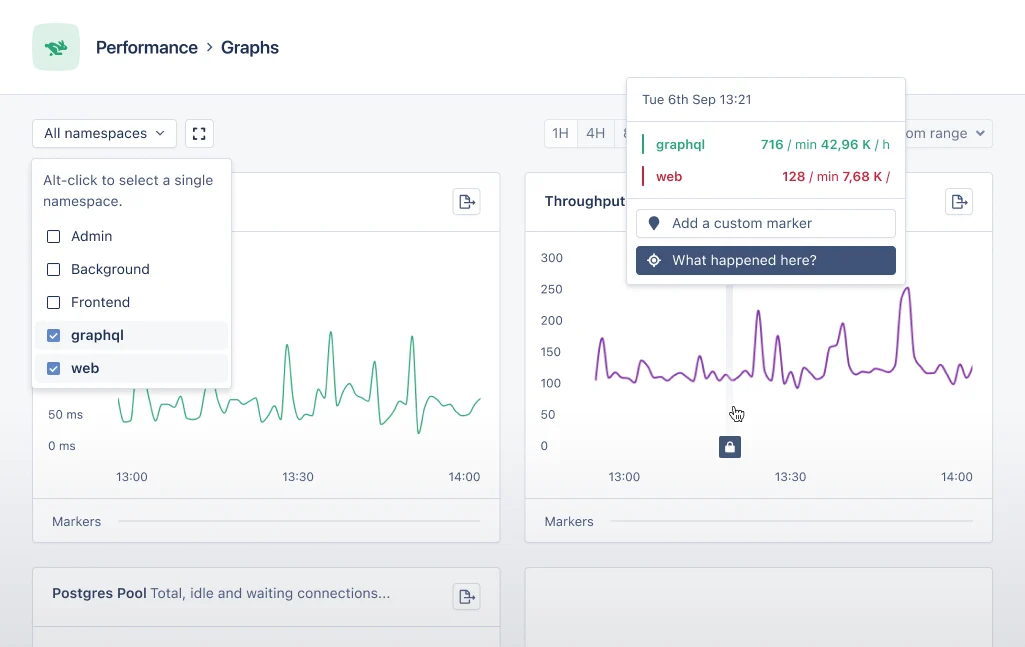
Namespaces are a way to group error incidents, performance incidents and metrics from [actions](/appsignal/terminology#actions). [By default](#default-namespaces) AppSignal provides three namespaces: the "web", "background" and "frontend" namespaces. You can add your own namespaces to separate parts of your app like the API or Admin panel with [custom namespaces](#custom-namespaces).
📖 Read our guide on [how to set up namespaces][guide].
## What can you do with namespaces?
Let's start first with the things we can use namespaces for:
* Group [error incidents](https://appsignal.com/redirect-to/app?to=exceptions) and [performance measurements](https://appsignal.com/redirect-to/app?to=performance) per namespace. Create overviews of the most important namespaces and fix those incidents first.
* Track and graph metrics per namespace ([error rate, error count](https://appsignal.com/redirect-to/app?to=exceptions/graphs), [throughput, response times, queue times](https://appsignal.com/redirect-to/app?to=performance/graphs), and more).
* Receive [Anomaly detection alerts per namespace](/anomaly-detection/).
* Set up [notifications settings per namespace](/application/notification-settings).
 ## Default namespaces
The "web" namespace holds all data for HTTP requests while the "background" namespace contains metrics from background job libraries and tasks. The "frontend" namespace is created by the [JavaScript front-end integration](/front-end).
You can add your own namespaces to separate parts of your app like the API and Admin panel.
## Custom namespaces
📖 The custom namespaces feature was introduced in AppSignal for Ruby gem version
2.3.0 and AppSignal for Elixir package version 1.3.0.
Using more than one namespace makes it easier to group metrics belonging to the
same part of an application together. In AppSignal we use custom namespaces to
accomplish this.
The advantage of custom namespaces is the ability to group together error and
performance incidents from separate parts of the same application. Think of an
administration panel, public homepage versus private back-end, etc.
The metrics from these three parts in one namespace can clutter the "web"
namespace with incidents of varying importance. For example, when something in
the administration panel breaks it's not as big of a problem when the sign up
page breaks on the public front-end.
The metrics from separate parts of an application can be grouped together in
their own namespace. By using the AppSignal instrumentation helpers for
setting a namespaces it's possible to assign
[transactions](/appsignal/terminology#transactions) to a certain
namespace.
Once the namespace is configured and the application is sending data to the
AppSignal, the new namespace will appear in the navigation on AppSignal.com.
Note: Data previously reported for the same action is not moved to the new
namespace.
📖 To set up custom namespaces in your app, read our guide to [setting up
namespace with our integrations][guide].
Only letters and underscores are accepted for namespace names.
## Namespace limitations
Namespaces are great to split out certain parts of your application, but there are a few limits to namespaces.
For optimal performance it's recommended to not have more than **10-15** namespaces maximum. While we don't have a hard-limit on this number, we cannot guarantee performance when more than **15** namespaces are used.
## Ignoring namespaces
Sometimes you have a certain part of an application that does not need to be monitored by AppSignal. The most common use case is an administration panel that you use internally which doesn't need constant monitoring. By ignoring an entire namespace AppSignal will ignore all transactional data from all actions in the configured namespaces.
To ignore a namespace first make sure to configure AppSignal to report all actions you want to ignore under a certain namespace, as described in the [namespaces guide][guide].
Then configure AppSignal in your app to ignore the namespace, see our [ignore namespaces guide][ignore guide].
After restarting/deploying your app the actions in the selected namespace should no longer be reported on AppSignal.com.
📖 To configure AppSignal to ignore namespaces in your app, read our guide to
[ignoring namespace with our integrations][ignore guide].
## Deleting namespaces
If you created a namespace that is no longer active you can delete it from the [namespaces](https://appsignal.com/redirect-to/app?to=namespaces) screen under app settings.
We do not automatically delete a namespace if it is no longer receiving data.
[guide]: /guides/namespaces.html
[ignore guide]: /guides/filter-data/ignore-namespaces.html
## Default namespaces
The "web" namespace holds all data for HTTP requests while the "background" namespace contains metrics from background job libraries and tasks. The "frontend" namespace is created by the [JavaScript front-end integration](/front-end).
You can add your own namespaces to separate parts of your app like the API and Admin panel.
## Custom namespaces
📖 The custom namespaces feature was introduced in AppSignal for Ruby gem version
2.3.0 and AppSignal for Elixir package version 1.3.0.
Using more than one namespace makes it easier to group metrics belonging to the
same part of an application together. In AppSignal we use custom namespaces to
accomplish this.
The advantage of custom namespaces is the ability to group together error and
performance incidents from separate parts of the same application. Think of an
administration panel, public homepage versus private back-end, etc.
The metrics from these three parts in one namespace can clutter the "web"
namespace with incidents of varying importance. For example, when something in
the administration panel breaks it's not as big of a problem when the sign up
page breaks on the public front-end.
The metrics from separate parts of an application can be grouped together in
their own namespace. By using the AppSignal instrumentation helpers for
setting a namespaces it's possible to assign
[transactions](/appsignal/terminology#transactions) to a certain
namespace.
Once the namespace is configured and the application is sending data to the
AppSignal, the new namespace will appear in the navigation on AppSignal.com.
Note: Data previously reported for the same action is not moved to the new
namespace.
📖 To set up custom namespaces in your app, read our guide to [setting up
namespace with our integrations][guide].
Only letters and underscores are accepted for namespace names.
## Namespace limitations
Namespaces are great to split out certain parts of your application, but there are a few limits to namespaces.
For optimal performance it's recommended to not have more than **10-15** namespaces maximum. While we don't have a hard-limit on this number, we cannot guarantee performance when more than **15** namespaces are used.
## Ignoring namespaces
Sometimes you have a certain part of an application that does not need to be monitored by AppSignal. The most common use case is an administration panel that you use internally which doesn't need constant monitoring. By ignoring an entire namespace AppSignal will ignore all transactional data from all actions in the configured namespaces.
To ignore a namespace first make sure to configure AppSignal to report all actions you want to ignore under a certain namespace, as described in the [namespaces guide][guide].
Then configure AppSignal in your app to ignore the namespace, see our [ignore namespaces guide][ignore guide].
After restarting/deploying your app the actions in the selected namespace should no longer be reported on AppSignal.com.
📖 To configure AppSignal to ignore namespaces in your app, read our guide to
[ignoring namespace with our integrations][ignore guide].
## Deleting namespaces
If you created a namespace that is no longer active you can delete it from the [namespaces](https://appsignal.com/redirect-to/app?to=namespaces) screen under app settings.
We do not automatically delete a namespace if it is no longer receiving data.
[guide]: /guides/namespaces.html
[ignore guide]: /guides/filter-data/ignore-namespaces.html